Wednesday, August 8, 2012

Canon 7D Firmware 2.0 Now Available


Canon 7D Firmware 2.0 Now Available – Bigger Buffer, Manual Audio Levels & Lots More
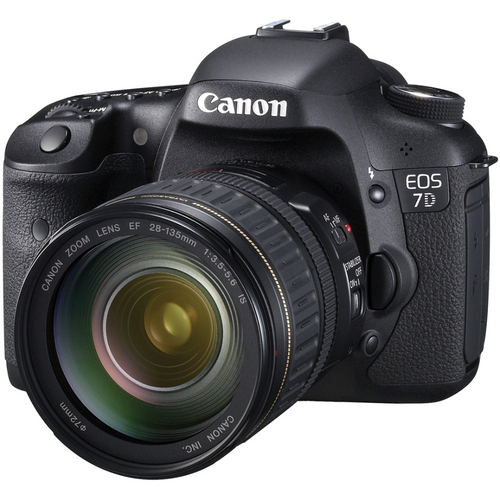
Canon 7D

The long-awaited firmware update for the Canon 7D is now available to download. Firmware version 2.0 provides the following updates for the 7D:
  1. Improves the maximum burst in continuous shooting.
    • JPEG Large/Fine: About 94 (126) bursts *1 -> About 110 (130) bursts *2
    • RAW: About 15 (15) bursts *1 -> About 23 (25) bursts *2
    • RAW+JPEG Large/Fine: About 6 (6) bursts *1 -> About 17 (17) bursts *2
      • *1 The figures are based on Canon’s testing standards (ISO 100 and Standard Picture Style) using a 4 GB card. The figures in parentheses indicate the number of shots that can be taken with an Ultra DMA (UDMA) 4-GB card, based on Canon’s testing standards.
      • *2 The figures are based on Canon’s testing standards (ISO 100 and Standard Picture Style) using an 8 GB card. The figures in parentheses indicate the number of shots that can be taken with an Ultra DMA (UDMA) 128-GB card, based on Canon’s testing standards.
  2. Supports a new accessory, GPS Receiver GP-E2.
  3. Adds an ISO Auto maximum setting.
  4. Adds an in-camera RAW processing function.
  5. Adds a Quick Control function during image playback.
  6. Adds a rating function.
  7. Adds a JPEG resize function.
  8. Adds an auto recording level manual adjustment function.
  9. Adds a function to freely set text for file names.
  10. Adds a function to make time zone settings.
  11. Increases the screen scrolling speed when magnifying images.
  12. Fixes a phenomenon where a slow shutter speed may result when an external flash is used to fire intermittent, consecutive flashes.
  13. Corrects the color space information in the Exif file for movies.
Get the update here on Canon USA’s website.

Wonderful World of HDR Photography – 20 Perfect Examples

Wonderful World of HDR Photography – 20 Perfect Examples - we really love to see how HDR photography is being embraced by the professional community and this great post highlights 20 examples of how HDR can be applied to create stunning imagery.

Age Progression - Photoshop Tutorial


Age Progression - Photoshop Tutorial

Here’s a little tutorial showing you how to go about aging a woman’s face in Photoshop. Candid shots, or any shots that have not been taken in a studio, work best because the resulting harsh lighting reveals more of the skin’s details i.e. slight bags under the eyes and faint wrinkles. The appearance of such details makes it all that much easier to visualize how your subject will age. Visualizing what the end result will look like brings you one step closer to aging her face realistically. http://www.exguides.org/photoshop-tutorials/age-progression.html


Tuesday, August 7, 2012

Lost camera -- recovered


2012-08-04T19:32:00Z2012-08-06T08:44:38Z"I think I found your camera": Visual clues help man solve mysteryBy JON ALEXANDER--jalexander@poststar.comThe Post-Star
August 04, 2012 7:32 pm •

HORICON -- The camera John Noerr found at the bottom of a small creek north of Pharaoh Lake in early July could have belonged to anyone.

It wasn’t until he took the Cannon XT digital camera back to his parents’ home on Schroon Lake that he discovered the crusty, soggy memory card still worked, with the most recent picture time-stamped in June 2009.

And the 581 photos it contained led the Poultney, Vt., art teacher on a three-week journey to find the camera’s owner.

“I started to realize there might be enough information here to track this guy down,” Noerr said Saturday.
The memory card’s contents contained a hodgepodge of urban streetscapes, photos of apparent loved ones and random signs.

He noticed most of the photos appeared to be in one general area, which he believed to be in one of New York City’s outer boroughs.

It was details like specific bagel shops and a unique purple door that caught his attention in a single self-portrait of an unknown woman.

“There were a lot of dead ends I followed,” he said.

But just two photos served as Noerr’s “holy grail,” a shot of a young woman sitting on a front stoop of a house numbered 327 and a shot taken seconds later of the sky that captured a street sign reading 3rd Street.
Noerr spent hours digitally walking New York’s streets using Google’s streetview.

“I toured every 3rd Street in Brooklyn, Queens and Manhattan, he said. “Then I saw a sign for that bagel shop, took a left and there it was, that purple door.”

He had found the right neighborhood, Brooklyn’s Bay Ridge community, and minutes later house No. 327.
Using public tax records he found the last name of its owners, the Comeau family.

That’s when the 39-year-old educator turned to social media.

He googled the last name and found the woman from the self portrait on Twitter and started a conversation.
“I said, ‘I think I found your camera in a stream in the Adirondacks,’ ” Noerr said. “She said, ‘I’ve never lost a camera in the Adirondacks, but my brother did.’ ”

It was Michael Comeau’s camera and Noerr finally contacted him Tuesday.

“There was a moment it could have belonged to any number of 7 billion people,” Noerr said. “Then, there was a moment when it belonged to just one.”

Comeau accidently dropped it from a bridge while camping in the area with friends in the summer of 2009, he said.

“I had kind of given up on it,” Comeau said.

Among the 581 photos included countless memories that Comeau has no doubt forgotten about, he said, as well as family photos of now-deceased relatives.

“It’s one of those little miracles,” Comeau said. “It’s totally bizarre. I can’t wait to get it back.”

Comeau said he intends to make a book out of the 581 pictures that spent three years entombed at the bottom of that small Adirondack creek.

But what would drive a man on summer break to undertake such an investigation?

Noerr said it’s because the information available in the digital age offered the opportunity.

“Because it’s possible,” he said. “I’ve been all over the world on Google Earth.”

And Noerr’s side-career in photographic investigation may not be over.

Late last week, he contacted an American tourist in Greece who posted on the Internet he had found a camera on a Mediterranean island.

“I’m trying to find a specific restaurant on the island of Corfu,” he said.

New eBook - Dodge & Burn


New eBook - Dodge & Burn

We've just released Piet van Den Eynde's new book, Dodge & Burn, Leading the Eye
with Lightroom and Photoshop. There are 3 things I know about anything Piet
writes - the first is that it's going to be amazing. The man just knows how to
teach, and even though English is not his first language, [...]

http://www.pixelatedimage.com/blog/2012/07/new-ebook-dodge-burn/

Monday, August 6, 2012

Betty's Skies, Textures and Composites Post Processing Workshop Sat Sept 8th 1-4pm


Betty's Skies, Textures and Composites Post Processing Workshop
Saturday Sept 8th 1-4pm in Hamden CT

Join Betty Wiley for this 3 hour workshop on replacing skies and using various texture overlay techniques to enhance images.  This post processing workshop will be an intensive, hands-on class and students are asked to bring ~3 of their own images to work on.

Betty will be presenting a brief slide show with images she has worked on and transformed using various different techniques. This will be followed by a step-by-step demonstration which will be accompanied by a written hand-out which will allow the student to follow along.  The remainder of the workshop will be spent with students working on their own images using the techniques that Betty has demonstrated.

The goal of this workshop will be for each student to leave with a thorough understanding of the processes and techniques involved so that they are competent to do this on their own.  Betty will also provide each student with a CD of skies and textures that they can take home.   If you have wanted to learn how to replace boring, drab skies and use textures to add drama and impact to your images, now is the chance!

Need To Bring: Students will need laptops or a portable desktop with either Photoshop or Photoshop Elements (a version that supports layers and masking, 9 or 10 work well) and 3-4 images that they want to work on that are preloaded onto their laptop/desktop or on a thumb drive so they can be found easily. If you do not have a laptop or desktop you can bring, you may share with a friend if that works for you.
**While high proficiency is not required for Photoshop or Elements, knowledge of how to navigate the programs, download images from a CD and find them, and move them around your laptop and software programs is required.**

Here are some examples of before and after post processing by Betty Wiley.


Bio:
Betty Wiley is an award-winning photographer who currently resides in Massachusetts on Cape Cod.  Her favorite subjects are birds and wildlife and she is an accomplished landscape photographer.  She also loves photographing children and operates a small studio out of her home, AvaGrace studio (www.Avagracestudio.com). Retired shortly over 3 years ago from a long, rewarding and successful career in the biotech industry where she specialized in licensing products to treat rare genetic diseases, she loves having the freedom now to pursue her passion for photography.  She belongs to several local camera clubs, Cape Cod Art Association Camera Club (CCAACC) where she was named “photographer of the year” for 2010, and also to Cape Cod View Finders Camera Club (CCVFCC) where her image of sandhill cranes won "image of the year" for 2011.  Betty recently received a commendable award in the International Nature Photography competition sponsored by the Audubon Society.  Betty's images frequently appear in Cape Cod magazine and she was featured in a photo essay which appeared in the July (2011) issue which showcased some of her images taken on Cape Cod and the islands.  Betty is also a Getty image contributor and has sold work to companies such as American Eagle Outfitters.

Here's an opportunity to learn from the master, you'll leave this workshop with all the tools you'll need to create your own works of art.

To sign up for this workshop, email Lisa at photographer67@comcast.net and mail her a check for $50. You are not signed up until the payment is received.

Refund Policy: If you find you cannot attend, it is up to you to find someone to take your place. Refunds only if we have to change or cancel. Thank you.


How AP photographer captured Gabby Douglas Olympics photo: Practice, practice, practice


How AP photographer captured Gabby Douglas Olympics photo: Practice, practice, practice


"Gymnasts do the same routines over and over, so Bull and the other two AP photographers covering gymnastics that night knew what moments they wanted to capture. Bull had photographed the gymnastics Olympic trials in San Jose, Calif., a month ago, so he had seen the routine about five times already."

"He had tried to capture it before, but it never quite worked — he was too late, perhaps, or she was off-center. His photo “didn’t seem to be as amazing as I thought it would be,” he said by phone."

"Deputy Director of Photography Denis Paquin told the Associated Press, “the beauty of the shot lies in the combination of ‘the graceful motion and the horizontal lines between the balance beam and her perfectly-positioned body – all captured at the precise moment during her routine.” "

GBH eating Frog


You have to take a look at Tara Tanaka's photographs!

"I’ve always liked frogs, and felt really bad for this one, who appeared to understand the inevitability of his fate."

Using HDR instead of Fill Flash to Deal with High Dynamic Range

Using HDR instead of Fill Flash to Deal with High Dynamic Range


A Guest Post by Suzy Richards

HDR has made a very negative name for itself but in some situations it can be a life saver. One instance where I have started to use it recently is in situations where I would have previously used fill flash if I wanted a more even exposure.

http://feedproxy.google.com/~r/DigitalPhotographySchool/~3/ywWljqAMkCA/using-hdr-instead-of-fill-flash-to-deal-with-high-dynamic-range?utm_source=feedburner&utm_medium=email

6 Strategies to Make Sure You Get Those Travel Photos Home

6 Strategies to Make Sure You Get Those Travel Photos Home

Read more: http://digital-photography-school.com/6-strategies-to-make-sure-you-get-those-travel-photos-home#ixzz22jkP5OqC

Sunday, August 5, 2012

Composite Images: Use Photoshop To Blend Multiple Photos


Not every photographic image can happen in camera.  Sure, as photographers, it is ideal to get white balance and exposure right, but some scenes can only happen with manipulation after the fact.  Enter…post-processing.  Enter….Photoshop.

lion Composite Images: Use Photoshop To Blend Multiple Photos
The photo above consists of many photos combined using Photoshop.

For starters, fashion photographer Laura Marino told me about this lion in the Oakwood Cemetery in Syracuse, New York.  It became the foundation for the photo.  She wanted to use the lion for a shoot with one of her models, but it was in a difficult place to shoot, hidden by many trees. The Lion was grand.  Rather than view it with the eyes of a photographer, I imagined it through the eyes of a photo editor.

Read on and see the photos here: 
http://feedproxy.google.com/~r/mcpactions/~3/dE-ewVYpiTg/?utm_source=feedburner&utm_medium=email

Saturday, August 4, 2012

Aug. 12: Perseid meteor shower

taken from here: http://www.space.com/14085-12-amazing-skywatching-events-2012.html

Aug. 12: Perseid meteor shower

Considered to be among the best of the annual displays thanks to its high rates of up to 90 per hour for a single observer, as well as its reliability. Beloved by summer campers and often discovered by city dwellers who might be spending time in the country under dark starry skies. [10 Perseid Meteor Shower Facts]

Last summer a bright moon wrecked the shower by blotting out many of the fainter streaks, but in 2012 the moon will be three days past last quarter phase on this peak morning – a fat waning crescent presenting only a minor nuisance for prospective observers.

Fall Photography Workshops 20% off coupon


Save 20% off our fall photography workshops with promo code "fall2012"!

Aperture Academy Photography School


Yellowstone "Wild Side" Photography Workshop: October 2nd,3rd and 4th

Join us for 3 full days of photographing wildlife and the surreal landscapes of Yellowstone National Park!

Grand Teton Landscape and Wildlife


Truly a photographer's paradise - fall colors are at a peak and the wildlife is abundant!


Desert Southwest Workshop


Come explore Arches and Canyonlands National Parks! There are so many iconic locations that we spend 2 full days in the field!


Grand Canyon Workshop
Come explore and photograph some of the most amazing landscapes in the entire world -- Slot Canyons, Horseshoe Bend and more!


View all upcoming photography workshops...

Space is limited for these workshops -- Reserve your spot today!

Aperture Academy (Located in the Campbell Pruneyard)
1875 S. Bascom
Campbell, CA 95008
(408) 369-8585

West Virginia Mountains, Fall Foliage Weekend.


WV--12-14 Oct
West Virginia Mountains, Fall Foliage Weekend.  
Includes Canaan Valley, Black Water Falls Park & other local hot-spots.  
Potential subjects: fall color, waterfalls, beaver ponds, mountain vistas, deer, muskrats, waterfowl, and other wildlife. Photo sessions are followed by critiques.  Accommodations included at Canaan Valley Resort.  Limited to 10 participants.  Workshop leader: Irene Hinke-Sacilotto, Osprey Photo Workshops & Tours.  (7th or 8th workshop I have operated at this location.)  
For more info or to register contact, 410 679-2873(home/work), 410 960-5871(mobile) {leave message if no answer & will return call},e-mail ospreyphot@aol.com, website www.ospreyphoto.com, blog www.photoworkshops-sacilotto.com

Friday, August 3, 2012

Light: Installations at Longwood Gardens

Tom and I were at Longwood Gardens last Saturday. We got there at 9am when they opened and left at 11:30pm!

You can get a tripod permit and photograph in the conservatory until noon and all day on the grounds. The orchids and water lilies were fantastic! The flower walk was all done by color, changing tones as you walked along. And the night installation was amazing! If you have a chance to go -- GO! Don't miss it!

http://longwoodgardens.org/light.html
Light: Installations by Bruce Munro
Photos taken from Longwood website, not ours, they have the artists' credit on them.


Experience Longwood Gardens in a whole new Light through the evocative and imaginative art of Bruce Munro, British artist and light designer.

Open through September 29, with extended evening hours Wed–Sat until 11:00 pm, through September 1!

Buy before you arrive • Timed admission tickets required • Tickets limited

Buy tickets online, in the Visitor Center, or by phone at 610-388-1000 (additional fees apply for phone orders). Members, click here to make your reservations for Saturday nights.

Make the most of your visit with our Light Visiting Tips.
Never before seen in the United States, this debut exhibition illuminates the gardens with large-scale, site-specific light installations.
Wander through a field of light reminiscent of flowers, discover a meadow of glowing towers changing hues, and delight in a shower of cascading raindrops fashioned from delicate lights as you are immersed in a new and truly unique garden experience. Both indoors and outdoors, by day and by night, Light! will change the way you see gardens.
For more information on Bruce Munro's work please visit www.brucemunro.co.uk.

Download the Light App!

Amp up your experience by downloading our free Light app for Apple and Android. Access exclusive content, watch videos of the installation, listen to the artist's inspirations, share your best photos, and more! Download the app now.

Watch us create Light

Tune in to a behind-the-scenes look at the installation process on Youtube.

Visiting Tips for Light: Installations by Bruce Munro

To experience Light we recommend purchasing timed admission tickets in advance to guarantee entry. Timed admission tickets limit the number of people in the Gardens, providing a better visiting experience.

Click here to purchase your timed admission tickets
Here are a few suggestions to help plan your visit:
  1. Light is on view from June 9–September 29, and is best viewed at night. Extended evening hours Wed–Sat until 11:00 pm, through September 1! See more hours. Please note: we are open until 6:00 pm on Wednesday, July 4.
  2. Download the Light: Installations by Bruce Munro App!
    Amp up your experience by downloading our free Light app for Apple and Android. Access exclusive content, watch videos of the installation, listen to the artist's inspirations, share your best photos, and more! Download the app now.
  3. Timed Admission Tickets are required, and can be purchased in advance online. Print your tickets at home to avoid lines once you arrive. Tickets may sell out, so purchase early to avoid disappointment!
  4. Timed admission tickets require you to choose the date and start time of your visit. Once you enter the Gardens, you may stay as long as you wish.
  5. Members are required to make reservations if they plan on visiting after 4:00 pm on Saturdays. Reservations can be made online. Find out more about visiting Light if you are a Member.
  6. Check our Hours page to ensure Light is on view the evening of your visit. Due to special programming, some evenings may require a special event ticket. To view Light on Fireworks & Fountains evenings, you must have a Fireworks & Fountains special event ticket. Fireworks & Fountains nights are: July 3 & 21, August 11, September 1 & 29.
  7. Tickets purchased for special events (Fireworks & Fountains Shows, ticketed concerts, ticketed dining events) are considered timed admission tickets for that date and Light will be on view during evening special events.
  8. Groups (15 or more) must book in advance due to limited availability and all groups receive a 30% discount. There are no options for guided tours of the exhibition.
  9. Plan to arrive at Longwood Gardens well before sunset to enjoy the Gardens by day and by night. Allow ample travel time.
  10. Parking is free. Remote parking is used if needed. Transportation from remote parking areas to the Gardens is provided.
  11. You may wish to bring a flashlight.
  12. Light is a rain or shine, indoor and outdoor experience. Scooters, wheelchairs, and strollers are available (for a fee for non-Members) on a first-come, first-served basis in the Visitor Center. Shuttle service is not provided. Due to varying terrain and pathway surfaces, some areas of the Light installations are accessible by foot only.
  13. Don't have a Smartphone or tablet? You may also rent an iPod that includes our free Light Appfor $5. For more details, stop by the Guest Services desk in the Visitor Center.

Thursday, August 2, 2012

Camera Strap

I have blogged about my camera straps before, and many of you have asked me about them!
http://www.phatstraps.com/

I have SIX of their straps, one is just for the holidays and one is Cat in the Hat that I wear in the studio when photographing kids. I love these straps! I always get compliments on them and people ask where I got it.


But the last order I received they sent me the wrong length strap. It was a wonderful BIRD print that I just loved, with a brown minky backing. I did NOT measure it when it arrived (who knew I would have to?).

After months of always having problems with this one particular strap I finally laid it out with two other straps and discovered that it was much longer than all of the other straps that I ordered. I ordered the same 30" strap for all six straps, but for this particular one they sent me the wrong size. The increased length causes it to fall much too low and makes it very uncomfortable to wear. I guess I should have measured it when it arrived to make sure that they sent me the correct strap.


I was very disappointed in their customer service (the owner Jo Keyes) would not let me exchange the strap nor would they give me a discount towards a replacement strap. :-(

I understand that I wore the strap and I understand that if I had discovered it upon arrival they might have replaced it, but it is not like I ordered the wrong strap, they sent me the wrong strap!

I am very sad because I love these straps -- their feel, their construction, their patterns, but I do not like their customer service :-(


Hi Lisa,
I am sorry to hear you are disappointed in our decision regarding this matter.  We would certainly have been quick to fix "our mistake" had we been notified in a timely manner. I'm terribly sorry we were unable to come to an agreement on this.  We hope you continue to use PhatStraps as your first choice in camera straps.  Thank you for contacting us and let me know if there is anything else we can help you with.  Sorry for any inconvenience this has caused.

Jo Keyes
PhatStraps Inc
6513 Smithfield Rd |Suite G | N Richland Hills, TX 76182

And they recently added this to their website
IF THERE HAS BEEN AN ERROR ON OUR PART, YOU MUST CONTACT US WITHIN 3 DAYS OF RECEIVING THE ITEM. NO EXCEPTIONS.

so buyer beware...

for sale Epson Stylus 2200 printer with inks and 4 extra cartridges


Epson Stylus 2200 printer with inks and 4 extra cartridges, $350.

contact mindseyebv@comcast.net or  203 488-4688
Barbara

The New Iris Blur Filter In Photoshop CS6


In this tutorial, learn how to create highly customized blur effects with an image using the new Iris Blur filter in Photoshop CS6, which takes everything Field Blur offers and adds even more fine-tune control!

First Look: Adobe Photoshop CS6


Photoshop CS6 will change the way you work. It's got big, head-turning features and little, barely noticeable improvements that you will suddenly realize have changed your Photoshop workflow for the better.

Gary Fong - NEW Book Is Out


Gary Fong -  NEW Book Is Out

Thanks to so many of you who helped me choose the RED cover as the art for my book.  The book is done and it's awesome!  What's it about?  It's an antidote to all of the rah-rah workshops and seminars out there who promise huge "Rockstar" success but are all hype but little real info!

You can read preview pages at http://www.buygarysbook.com

I'm proud of this book, it's some of my finest work.  Thank you!

Gary Fong
Gary Fong, Inc.
228 Park Ave S Ste 36122
New York New York 10003-1502
United States 

New Product Speical! - The Lightning Bug; Capture Lightning from Your Camera!!

New Product Speical! - The Lightning Bug; Capture Lightning from Your Camera!!


http://wbhunt.com/specials 


The Future of Photography Revealed


The Future of Photography Revealed


on August 18th Will Crocket brings his tour to the Holiday Inn in Rockland Mass., “The Future of Photography Revealed.” This covers some of the amazing tools available to today photographer. This two hour session will include a free DVD, “Picture That Move”, a “how-to” and pictorial presentation by Will Crockett valued at $39. Sign up early since there is limited space in available for this event.

Will Crockett - "The Future of Photography Revealed!" Tour www.FutureofPhoto.com


Bob Harrington Saturday August 11th "Lighting with Flash" seminar


HUNTS PHOTO presents two special seminars. First join Instructor Bob Harrington on Saturday August 11th For a Special Lighting with Flash seminar which will include an opportunity to shoot and try out these techniques at the end of the class. Then on August 18th Will Crocket brings his tour to the Holiday Inn in Rockland Mass., “The Future of Photography Revealed.” This covers some of the amazing tools available to today photographer. This two hour session will include a free DVD, “Picture That Move”, a “how-to” and pictorial presentation by Will Crockett valued at $39. Sign up early since there is limited space in available for these two events.

Class Registration at:  Bob Harrington - Bending Light to Your Will: Creative Lighting with Flash
http://bobsclass.eventbrite.com


30 + Mind-blowing Examples Of HDR Photos

30 + Mind-blowing Examples Of HDR Photos - another really great set of HDR images is posted here for everyone to view.  This series once again highlights how HDR can be used to create stunning imagery using subtle post-processing techniques to bring the scene to life.

2012 Plainville Balloonfest August 24th, 25th, 26th.

The 2012 Plainville Balloonfest will be held on August 24th, 25th and 26th.


The festival opens up Friday night @ 5 pm, music begins @ 6 pm till 9:45 pm ( during the fireworks), balloon glows from 8:15 till 9 or until the fireworks begin and fireworks begin around 9 pm. 


 Saturday the festival opens @ 6 am with a balloon launch(weather permitting), an all day craft fair from 9-5, Classic Car show from 12 noon till 5 pm, balloon launch @ 6 pm and live entertainment from 12 noon until 10 pm from various acts. 


 Sunday opens @ 6 am with the final balloon launch and the festival closes at 9 am.


http://www.plainvillefireco.com/Balloon_Festival.html

Wednesday, August 1, 2012

items for sale

Rick has some items that he is selling, these prices are a steal so I do not expect them to last long!

For anyone that uses Photoshop and does not use Topaz you have get this plugin!! It is better than Nik and one-one combined! Tom and I use it on almost every photo!

The Epson 2200 is an awesome printer! And I still use the picturemate! quick easy 4x6s -- and portable!

Lisa

If you are interested in these items you must contact Rick directly at rsereque@ix.netcom.com


Epson Stylus Photo 2200 Inkjet Printer – New in box with an additional set of 8 unopened inks.  $319
Eight-color Ultrachrome inks (7 colors plus matte black)
Up to 13” x 19” print (13” x 44” with roll paper); 2880 x 1440 resolution
Includes roll paper holder and built-in automatic paper cutter

Epson Stylus Photo R2400 Inkjet Printer– Very light use plus additional 11 unopened inks  $349
Nine-color Ultrachrome K3 inks (8 colors plus matte black)

Note: To the 1st purchaser of the Epson 2200 or R2400, I have a used, working Epson Stylus Photo R300 inkjet printer (needs ink) that you can have if you’d like.

Epson PictureMate  Express Edition Personal Photo Lab – New in box  $69
Makes 4x6 prints (only) in 80 seconds; does not need a PC; 6-color archival pigment printing
5760 x 1440 dpi; tiny desktop footprint
Can produce color, B&W, sepia, wallet size (2-up), classic borders, borderless, proof sheet
Includes paper and ink for (20) 4x6 glossy prints – water and smudge proof
Replacement PrintPacks include paper and ink in one box

Topaz Labs Bundle – Plug-ins for Photoshop, Elements, Lightroom, Aperture, iPhoto – PC and Mac  $149
Eleven programs: Adjust, B&W Effects, Clean, DeJPEG, DeNoise, Detail, Fusion Express, InFocus, Lens Effects, ReMask, Simplify

Adobe Photoshop CS4 Upgrade (Windows) – New in box  $79

Wacom Intuos 3 Tablet 6 x 11 – New in box  $249
With Express Keys, Touch Strips, Pen Tilt
Includes Grip Pen, 5-button mouse, pen stand, Photoshop Elements & other software

Rick Sereque
203-888-1259

expose to the right


expose to the right

Exposing to the right is a practice that many people don’t follow precisely because RAW files do stand up so well to post-processing. But shooting RAW doesn’t give us an excuse to be sloppy, and exposing to the right is important for two reasons. The first is simple. If you underexpose an image and then have to pull out shadow detail from the darker areas of an image, you’re going to be introducing noise. But darkening slightly overexposed areas will not give you a loss in quality. This is true because of the second reason
.
This second reason is even more compelling but requires a bit more explanation. DSLR cameras in general have about five stops of dynamic range. Recall from above that a 12-bit RAW file has 4,096 possible tonal values in each color channel. If we array the stops of dynamic range along our monochromatic or luminance histogram, we’ll notice that each stop (from left to right) contains two times more information than the previous stop. And notice also that most of the possible color values are in the brightest areas. That is, our camera can capture only a relatively few dark tonal values and lots of bright tonal values
.
histogram expose to right

As the figure above illustrates clearly, fully half of the tonal values are in the brightest fifth of the histogram. So, if you don’t have at least some pixels heading out into that rightmost fifth of the histogram, you’re wasting half of the potential tonal information that your camera can capture!

Exposing to the right does not mean overexposing to the extreme though. It simply means that you should expose your image so that the brightest tones in your scene display out into the right fifth of the histogram. If you want detail in the whitest or brightest parts of the scene, however, you need to take care to take them just to the edge of the histogram but not over.

Take the image of a Montezuma oropendola below. This is one of the tougher birds in Costa Rica to expose properly because of the white skin on the face and the black feathers around the head and neck. Underexpose this one, and you’ll have no feather detail in the blacks. Overexpose too far, and the white skin will be blown out white with no detail at all.

Below is a screen shot of my untouched RAW file and the resulting histogram. Notice that there is some space on the left edge of the histogram. This means that the dark feathers are not pure black. And notice that the brightest pixels go right out to the right edge but not past. This means that I made the image as bright as I could in order to capture feather detail in the blacks but without blowing out the white skin. You’ll note also that there is a large amount of pixels clustered toward the middle right of the histogram. This is the background, which is represented by brighter than average mid-tones. The background in this shot was distant forest but there was some fog moving through, which meant that the background was indeed a bright but fairly dull green.

oropendola histogram

In terms of exposing to the right, there is a caveat that applies especially to the rainforest, where light is usually scarce. Let’s say that I’m shooting a monkey that’s moving around a bit. I have my lens aperture set wide open, I’m getting only 1/60 of a second, and I’m already at ISO 3200. That is, I’m doing everything possible to get just barely enough light for a sharp image. I take a shot and check my histogram and find that I really should be pushing my exposure one stop to the right to get good detail in the monkey’s dark fur. I have a bit of a dilemma now — how to get that extra stop of light.

I can’t open up my aperture any further; it’s already wide open. If I adjust my shutter speed to let in one stop more light, I drop to 1/30. I think that’s going to make it hard to get a sharp image in this situation, and it’s also placing me into the territory where mirror vibration becomes a concern. So, I don’t want to take my shutter speed any slower. I could take my ISO from 3200 to 6400 but, even though my Mark IV is quite good at high ISOs, I’m not enamored of 6400. So, this is a case where not exposing to the right and brightening the exposure in post-processing may actually be a better or at least equally valid choice. I want a sharp image so I need that shutter speed. And going to ISO 6400 will introduce noise, perhaps just about as much as taking the image at ISO 3200 and brightening it by one stop in post-processing.

This, of course, is a fairly extreme situation but it’s worth noting because there are some potential tradeoffs involved when exposing to the right. Still, it’s a good habit to have and will help you to get the cleanest image files possible in the vast majority of shooting situations.

The above was taken from http://www.deepgreenphotography.com/2012/01/top-5-tips-for-quality-image-files/ -- you definitely need to read the whole article!

Redcoats & Rebels - August 4-5


Redcoats & RebelsRedcoats & Rebels - August 4-5

More than 800 Revolutionary War soldiers will converge on Old Sturbridge Village for the annual Redcoats & Rebels event. This is one of the most popular events on the OSV calendar with its large mock battles. And with free second day admission, you can pay once and attend both Saturday and Sunday! Stay late on Saturday and see the soldiers around the campfire. Watch a video or learn more.

couponSave $5OSV LogoPrint this coupon and present it at the Visitor Center to receive $5 off one regular daytime adult admission at Old Sturbridge Village.  Limit one coupon per party. Does not apply to education groups or group tours. Not valid on previous purchases or combined with other offers.
www.osv.org  
Offer Expires 1/31/13- Coupon Code:  News-1230

Natural Mirrors in US National Parks

Natural Mirrors in US National Parks by QT Luong - a wonderful collection of high quality images featuring spectacular reflections.  This slideshow presents absolutely beautiful landscapes and highlights the natural wonder found in these national parks.

shoot RAW


This is a great article!

#1 shoot RAW

You don’t have to shoot in RAW; JPEGs are quite capable of producing good images. If you’re a hobbyist and want to produce pictures ready to print and share, get out there and shoot some great pictures in JPEG. But if you’re looking to take your nature photography to the professional level, RAW is for you. Why? JPEG files don’t make use of the vast majority of the information that modern DSLR cameras are capable of capturing; RAW files do and that translates ultimately into more control over image optimization and higher-quality large prints.

Here’s how it works. Each pixel on your camera’s sensor consists of three color channels — red, green, and blue. JPEGs are 8 bit files, which means that 8 bits of binary information (1s or 0s) are possible for each color channel. Raising 2 to the 8th power (for each channel, either a 1 or a 0 is possible 8 times) gives 256 possible combinations for each color channel. Since there are three colors, we take 256 to the 3rd power (red, green, and blue), which yields a total of around 16.7 million possible color values in a JPEG image. Doesn’t sound too bad, right?

But now let’s look at RAW files. Most cameras these days capture RAW files with 12 bits. Using the same math as above, we have 12 possible binary outcomes for each color channel. So, 2 to the 12th power is 4,096. If we take those 4,096 possible tonalities for each color channel and look at all of the possible color values for the three color channels combined, we can take 4,096 to the 3rd power. This yields over 68 billion color possibilities. So, a RAW file has over 4,000 times as much potential color value information as a JPEG file. Put another way, if you shoot JPEG, you’re only using about 2.5% of the possible color information that your camera is capable of recording!

In addition, JPEG files are compressed in a lossy fashion, which means that some of the relatively limited information captured in the first place is thrown away to keep file size smaller. So, on top of the fact that JPEG files start with less information than RAW files, they then throw away some of that information during the compression process. Do note that RAW files also are compressed but using mathematical algorithms that are lossless, meaning that no image data are thrown away in compression in order to reduce file size.
Since JPEG files offer less information for editing in the computer, you’ll most likely want to have the images come out of the camera with saturation and sharpening already applied. Unfortunately, you may or may not like how your camera handles this “post-processing.” Most pros want to be in control of how their images look when they go on the web, for fine art printing, or for a magazine or coffee table book. RAW files take advantage of your camera’s sophisticated image capture capabilities and allow you to stay in control of optimizing your images in the computer.

RAW files, with their vastly greater information, also give better results when upsampling a file beyond your camera’s native sensor resolution, a necessary practice for selling large fine art prints or doing a gallery exhibit. By way of example, I shot the cloud forest image above with a Canon 20D, an 8 megapixel camera. I was able to work from the RAW file and upsize it for printing at 30 x 45 inches for my gallery exhibit at the Missouri Botanical Garden in the US a couple of years ago. This is fairly extreme upsizing, but the image looked great in the exhibit hall.

Read the rest of the article: TOP 5 TIPS FOR QUALITY IMAGE FILES

DIY: Turn Your Fridge into a Gallery Wall, Make Photo Magnet Mosaics!


DIY: Turn Your Fridge into a Gallery Wall, Make Photo Magnet Mosaics!

Follow this tutorial for a step-by-step guide to make miniature works of art in the form of magnetic photo tiles.


http://content.photojojo.com/diy/make-photo-magnets/

Take a Ride for Charity! at the Annual Sunflower Maze


Lyman's 6th Annual Sunflower Maze


Lyman's 6th Annual Sunflower Maze will be open from July 28th - August 26th.

For more information on the Sunflower Maze, please visit Lyman Orchards.  

Admission
Ages 13 years and up: $10.00
Ages 4 years to 12 years: $5.00
Group Rates are available


Hours
Open everyday, weather permitting: 9am-5pm
Last entry time into the Maze is 4:30pm; ticket sales also close at 4:30pm.


Enjoy the view from a hot air balloon!

Take a Ride for Charity!

Saturday and Sunday, August 11th & 12th
Enjoy a bird's eye view of the Sunflower Maze and the surrounding orchards from the RE/MAX hot air balloon!

Weather conditions permitting, the famous RE/MAX balloon will provide tethered hot air balloon rides for visitors!

RE/MAX is a long-time supporter of Connecticut Children's Medical Center, and we are proud to partner with them again at our Sunflower Maze!
All proceeds from balloon ride fees will be donated to support the kids of Connecticut Children's.

Is your company
planning a group outing
at Lyman Orchards this summer?

Include a visit to the Sunflower Maze in your activity schedule!
In addition to its fun navigational challenges & serene surroundings, the Maze provides wonderful teambuilding opportunities.
For more information on group outings and food packages available at Lyman Orchards, contact coordinator Nancy Brennan, or call Nancy at 860/349-6046.