Rescuing Photos
I had this conversation the other day and thought that I would re-blog something that I have talked about in the past, especially in light of the upcoming camera club trip to Italy. I also recently heard of someone going back to a place to retake all of their photographs because their images disappeared. Like a fire drill or any other kind of emergency preparation, knowing what to do ahead of time makes it easier to do it in case of a real emergency. So if a memory card fails or if you accidentally reformat a card that has not been downloaded do not panic; if you are traveling just put the card aside and recover the photographs when you are at a computer. Almost all of the images can be recovered. We know, we have been there. Lisa
What do you do when a CF card fails?
Freak out? Hyperventilate? Swear? Cry?
No!
Why Not? Because you will have practiced and know that you can recover these images.
If you reformat a card, or if a card fails -- STOP. Do not take any more photos. Use the rescue software. If you are away from your computer, STOP using that card and set it aside.
Kind of life a firedrills -- try a practice run and rescue your photos. Do this to learn how to rescue your images when your adrenaline isn't running and you are freaked out because you formated your memory card before you downloaded or your get an error message from your memory card. If you are prepaed you should not panic.
It's simple to try -- Format your memory card and then run the software and rescue your images. Try this on a card that you have already downloaded, if you know that you have recovered before you won't freak out if you actually NEED to recover images. You can try this for FREE.
PhotoRescue makes some really great image recovery software. In addition to the usual RAW file format updates, this version allows the extraction of large thumbnails from RAW files. As raw files of top DSLRs grow bigger, so do the embedded JPEG (or even small raw) thumbnails. While their quality obviously is not as good as the raw files, they can save a shoot when the raw data is damaged beyond recovery.
Your card might even come with some rescue software try that too.
http://www.datarescue.com/photorescue/
card recovery
Lexar cards usually come with recovery software as well.
UNERASE Your Memory Card: DataRescue's PhotoRescue http://www.imaging-resource.com/... In our tests PhotoRescue recovered every image we erased and every card we reformatted. We were able to recover erased files on CompactFlash cards.
PhotoRescue is the best and fairest picture and data recovery solution for digital film - sd cards, compact flash, memory sticks, microdrive, etc... Featuring innovative recovery algorithms, PhotoRescue displays reliable previews of the recoverable pictures. What you see is what you recover, both on the Windows and on the Apple Mac OS X platforms. PhotoRescue has been awarded 4.5 stars by PCMagazine.
Please note that ANY storage is subject to a problem. For your hard drive the general consensus is not IF your hard drive will fail, but WHEN it will fail.
Yes, memory cards can also fail.
I personally have had a three of cards fail.
And twice I have also formatted over photographs that were not yet downloaded to my computer. When we were on our honeymoon we somehow reformatted a CF card that had not been downloaded. Argh! But all was not lost. I was prepared for this! We recovered all of the images!!
How?
Well, I had practiced this scenario, at home, under no stress. I HIGHLY recommend that you run through the recovery process under non vasodilating conditions because when it happens your adrenaline will be running and it will be much easier to stay calm knowing that you know how to rescue.
So, if you reformat a card, or if a card fails -- STOP. Do not take any more photos. Use the rescue software.
I have tried three programs -- they are free and you buy them if they work for you (they provide a free trial to see that they did indeed rescue your images). Sometimes one program works better than another. Like I said you can also try the one that is for your card type (Sandisk, Lexar, etc.) (some cards come with rescue software for free).
Showing posts with label advice. Show all posts
Showing posts with label advice. Show all posts
Monday, October 10, 2011


Monday, September 21, 2009
Photography Composition Articles
Photography Composition Articles
"There are no rules for good photographs, there are only good photographs." - Ansel Adams
The Master Guide for Wildlife Photographers: Wildlife CompositionsExcellent chapter from the book by Bill Silliker. Again, Amherst Media allowed us to publish it in our library. Check out really good examples.
Beginner's Guide to Nature Photography: CompositionExcerpt from the book by Cub Kahn. Amherst Media kindly allowed to publish it in our library.
Guidelines for Better Photographic CompositionPerfect examples for beginners, and intermetiate photographers. Composition rules: Simplicity, The Rule of Thirds, Lines, Balance, Framing, Avoiding Mergers.
Depth Of Field Calculator by Don FlemingReally good calculator with more than 400 cameras available.
Landscape Composition Rules by Johannes Vloothuis - What?! Article about painting, again? Yes. And I could say a good article! Almost all tips you may apply to photography. Really good examples!
Photography Tutorial: Composition by Geoff Lawrence - Composition advices, cropping techniques, viewpoint selection.
Learning to Photograph the Landscape by Guy Tal - First part of the article about all the desirable elements of a good landscape composition.
Learning to Photograph the Landscape by Guy Tal - Guidelines, Rules and Techniques: rule of thirds, leading lines, point of gravity, simplicity, equipment.
The Magic Of Selective Vision: Photo Composition by Arnold John Kaplan - Description of all the basic elements of the composition: balance, golden mean, lines, curves, colors.
An Eye for Composition by Gary Stanley - Rules, advices and inspirating examples.
Introduction To Photography Composition by Gao Mu - Several examples of composition rules.
Composition and the Elements of Visual Design by Robert Berdan - A lot of information: Lines, Shapes, Color, Texture, Image Balance, Proportion Rules, etc. Perfect examples.
Five Stops From The Edge by Bob Radcliff - Almost a "Zone System" in a color.
Colour Theory as Applied to Landscape Photography by Michael Reichmann - Good description of first and second order colors, complementary and harmonizing colours, intensity of light. Really nice photos as examples.
Basic Photographic Techniques (U.S. Navy training manual) - Don't be fooled by old B/W examples in this book. This is a perfect guide to better photography, and it contains really good examples.
Geometry in composition by Petteri Sulonen - Leading line, spatial divider, framing element, diagonal, triangle, arc and s-curve described.
Photo Composition by AGFA - Really good lesson. Take a subject and try to make all the composition variations. Nice examples.
Foreground and Lines by Kris Butler - Leading lines and their role in the human physiology.
The Art of Composition by Lee Frost - Good article about common rules and breaking them. Framing, rule of thirds, lines.
Composition (Part I) by Wendy Folse - Theme, Emphasis, Simplicity, and Rule of Thirds described.
Composition (Part II) by Wendy Folse - Horizontal or vertical format? Advantages and disadvantages.
Composition (Part III) by Wendy Folse - How to use perspective, what is the focal point, examples of in-camera cropping.
Composition (Part IV): Isolating the subject by Wendy Folse - Framing, selective focus, depth of field, distracting elements.
Framing Your Shots by Kris Butler - Guide from ACD Newsletters Editor.
Photographic Composition by Pony Express Photo School - Examples only, but good examples.
Composition: Understanding it - Using it by Larry Seiler - This atrticle was written for painters, but the image balance rules are perfect for photography.
Composition: Breaking all the Rules by Gloria Hopkins - WYSIWYG - breaking the composition rules!
Basic Photography Techniques by Klaus Schroiff - The golden mean, rule of thirds, framing, cross-lines described.
Photography Techniques: Perspective by Klaus Schroiff - Depth of field, focus, focal length, object isolation, separation, compression, layers.
Photography Techniques: Using Light by Klaus Schroiff - Spot light, backlit, monochrome, colors, etc.
Composition I: Getting Beyond the Snapshot by Gloria Hopkins - Composition guidelines: leading lines.
Composition II: Composition in Nature Photography and the Elements of a Photograph by Gloria Hopkins - Composition guidelines: light.
Composition III: Composition in Nature Photography and the Elements of a Photograph by Gloria Hopkins - Composition guidelines: depth and color.
Composition Basics - How to Get Good Pictures by umt.edu - Five sections from Introduction to Digital Photograpy: Composition Basics, Camera Composition, Camera Angle, Rule of Thirds, Types of Shots.
Composition with a 6x6...? Square Scotland by Wim van Velzen - How to compose your photos in medium format.
The Use of Focal Length in Landscape Photography by Wim van Velzen - Composition possibilities in different circumstances.
Tutorial on Composition Refresher by Peter Saw - Good and simple tutorial. Image balance, leading the eye, golden section, etc. This one is good for painters, but it's the same good for photographers.
Composition Refresher by Theresa Husarik - Several composition "do" and "don't" tips.
Learn Photo Composition by John Harvey - Interesting article with good examples.
Improving Your Photography: Composition. Lesson by Peter Ensenberger - Primary elements of a good composition.
Composition Basics lesson by Michael Fodor - General principles of the Rule of Thirds and the Golden Mean as well as several composition advises.
Rule of Thirds lesson by Michael Fodor - Examples of the Rule of Thirds.
The Golden Mean by Stuart Low - Natural and mathematical rules and how they have been applied in design.
Space, Figure, and Ground Lesson by Petteri Sulonen - The objective of this lesson is to introduce three fundamental elements in compositional thinking.
The Basics of Landscape Composition by Diane Johnson - This article is about painting, but it's applicable to the photography.
Photo Technique by James Gentles - Good description of golden rules.
Rule of Thirds by Edwin Leong - Photography e-Book, chapter 15. Several advices.
The Golden Ratio by Edwin Leong - Photography e-Book, chapter 16. Interesting description.
Lessons in Composition for the Amateur Photographer by Dale Cotton - This part is about "Rule of Thirds".
Proportions: Theorie and Construction by Volker Muller - Explained the mathematical rules of Golden Mean, Modulor, and Square Root of Two.
Composition by Michael Minner - Portrait photography and the Rule of Thirds.
Finding a satisfactory format for a square canvas by John Hagan - Paitings examples.
Photography, the Golden Mean, and Geeky Coolness by Laurie Nyveen - Several short examples.
Golden Section and Photography by Eugene Ilchenko - Several examples and photo-adjuster tool to help to adjust the composition.
Creativity and the Rule of Thirds by Jim Altengarten - Good article with description and examples.
The Rule of Thirds by John Longenecker - Description of the Rule of Thirds as well as a lot of related links.
Sunday, July 19, 2009
Supporting the camera: holding with your hands
This article by Vesna has some very good pointers, including "do" and "don't" photos. I know that, while I generally use a tripod, my left hand is not usually in the correct position for vertical hand-held photos.
http://vesnakozelj.com/photography/fundamentals/supporting-the-camera-holding-with-your-hands
Supporting the camera: holding with your hands
"How you grip the camera is often ignored and seen as unimportant. But is it really? Can you hold your camera steady? Even if you are holding it for longer times, especially if it is a DSLR with a heavy lens – won’t you get tired? One of the first things anyone – having bought the camera – should learn is how to hold it properly to capture sharp images. Correct grip is very important because it makes your camera more comfortable to hold, steadier and therefore it is easier to compose the images through the viewfinder (without shaky and tired hands). Keep in mind that only with the use of tripod one can ensure sharp images. It is good to learn how to make a “human tripod” with your body and hands, when you don’t have a real tripod at hand."
Read the rest of this article here, including photos: http://vesnakozelj.com/photography/fundamentals/supporting-the-camera-holding-with-your-hands
Similar articles:
http://digital-photography-school.com/how-to-hold-a-digital-camera
Sunday, July 5, 2009
AVOIDING BIG LENS DISASTERS
From Art Morris, Birds as Art
AVOIDING BIG LENS DISASTERS
Here is an important e-mail exchange with Dr. Joel Murphy:
AM: Hi Dr. Joel, re:
JM: Thanks for the advice on the Mongoose M3.5 tripod head; it is excellent and has performed flawlessly. I am using it with a Nikon D3 and (usually) the Nikkor 200-400 lens. I have the Mongoose mounted on an Gitzo GT3530 LS tripod. The tripod works fine when legs fully extended but it is very unstable and has fallen over many times when the legs were not fully extended resulting in damage to my Nikkor 200-400 lens. (I had to repair the lens with heavy duty bonding glue in remote Alaska because the tripod mount ring broke.) Can you recommend a larger tripod that is more sturdy?
AM: Before I answer, I need to say a few things.
#1: Here is the rule for big lens safety: if you leave your tripod unattended, it will fall over and result in damage to your equipment. Notice that it is not a matter of if, but of when.
#2: Before you set up a tripod, make sure that the legs of the tripod are all approximately the same length. If you put a rig down with one leg extended more than the other two, it is likely to fall over.
#3: Tripods that are fully extended are more likely to fall over than tripods with their legs shortened. And when they do go over, the damage will be greater.
#4: When setting down a tripod you need to be absolutely sure that the legs are fully splayed. With Gitzo tripods this means that the tab at the top of each of the three leg sections must be fully in and flash to the stop. And this goes double on windy days.
#5: When setting down a tripod on uneven ground it is imperative that the tripod platform be relatively square to the world, that is, the platform needs to be approximately parallel to level ground. To do this, you need to either lengthen the downhill leg or legs, or adjust the angle of either one or two legs by pulling out the aforementioned leg tab(s) and then pulling the leg or legs away from their original position so that the tripod platform is square to the world. The former is a dangerous choice; if you leave the uneven ground or hillside and put the rig down without remembering to even the leg lengths, the rig will likely topple.
#6: Here is the rule for big lens safety: if you leave your tripod unattended, it will fall over and result in damage to your equipment.
When big lenses on tripods hit the ground, it is always the fault of the photographer. If you leave your tripod unattended and a drunk comes by and knocks it over, it is your fault. Period. An option that I often use when I need to step away from my tripod is to simply lay the whole rig on the ground. If it ain’t standing, it cannot fall. If I am at the beach, I will lay the rig across my customized Xtrahand Magnum vest. (Everyone who sees one wants one: http://www.vestedinterest.com/)
We can recommend a larger tripod for you, but if you do not learn to follow the guidelines above religiously, it too will hit the ground.
Just for the record, here it is:
Gitzo GT5541LS Tripod, Item #: GT5541LS. Price: $949.98 plus shipping. This monster replaces the CF 1548, but is lighter, stiffer, and stronger. We recommend this model for folks with 400mm f/2.8 or 600 mm lf/4 lenses that do not feature IS or VR technology, and for those who—in their efforts to create the sharpest possible images—demand the most rigid long lens CF tripod available.
Sorry to have to be so frank but I can only call them as I see them. To sum up, you just need to learn to handle your gear more carefully. Heck, I speak from experience. Over the first ten years that I used big glass I destroyed about six big lenses. Each accident was my fault for one of the reasons above…
Later and love, artie
The next day, Joel e-mailed me an admission of guilt… On all counts.
AVOIDING BIG LENS DISASTERS
Here is an important e-mail exchange with Dr. Joel Murphy:
AM: Hi Dr. Joel, re:
JM: Thanks for the advice on the Mongoose M3.5 tripod head; it is excellent and has performed flawlessly. I am using it with a Nikon D3 and (usually) the Nikkor 200-400 lens. I have the Mongoose mounted on an Gitzo GT3530 LS tripod. The tripod works fine when legs fully extended but it is very unstable and has fallen over many times when the legs were not fully extended resulting in damage to my Nikkor 200-400 lens. (I had to repair the lens with heavy duty bonding glue in remote Alaska because the tripod mount ring broke.) Can you recommend a larger tripod that is more sturdy?
AM: Before I answer, I need to say a few things.
#1: Here is the rule for big lens safety: if you leave your tripod unattended, it will fall over and result in damage to your equipment. Notice that it is not a matter of if, but of when.
#2: Before you set up a tripod, make sure that the legs of the tripod are all approximately the same length. If you put a rig down with one leg extended more than the other two, it is likely to fall over.
#3: Tripods that are fully extended are more likely to fall over than tripods with their legs shortened. And when they do go over, the damage will be greater.
#4: When setting down a tripod you need to be absolutely sure that the legs are fully splayed. With Gitzo tripods this means that the tab at the top of each of the three leg sections must be fully in and flash to the stop. And this goes double on windy days.
#5: When setting down a tripod on uneven ground it is imperative that the tripod platform be relatively square to the world, that is, the platform needs to be approximately parallel to level ground. To do this, you need to either lengthen the downhill leg or legs, or adjust the angle of either one or two legs by pulling out the aforementioned leg tab(s) and then pulling the leg or legs away from their original position so that the tripod platform is square to the world. The former is a dangerous choice; if you leave the uneven ground or hillside and put the rig down without remembering to even the leg lengths, the rig will likely topple.
#6: Here is the rule for big lens safety: if you leave your tripod unattended, it will fall over and result in damage to your equipment.
When big lenses on tripods hit the ground, it is always the fault of the photographer. If you leave your tripod unattended and a drunk comes by and knocks it over, it is your fault. Period. An option that I often use when I need to step away from my tripod is to simply lay the whole rig on the ground. If it ain’t standing, it cannot fall. If I am at the beach, I will lay the rig across my customized Xtrahand Magnum vest. (Everyone who sees one wants one: http://www.vestedinterest.com/)
We can recommend a larger tripod for you, but if you do not learn to follow the guidelines above religiously, it too will hit the ground.
Just for the record, here it is:
Gitzo GT5541LS Tripod, Item #: GT5541LS. Price: $949.98 plus shipping. This monster replaces the CF 1548, but is lighter, stiffer, and stronger. We recommend this model for folks with 400mm f/2.8 or 600 mm lf/4 lenses that do not feature IS or VR technology, and for those who—in their efforts to create the sharpest possible images—demand the most rigid long lens CF tripod available.
Sorry to have to be so frank but I can only call them as I see them. To sum up, you just need to learn to handle your gear more carefully. Heck, I speak from experience. Over the first ten years that I used big glass I destroyed about six big lenses. Each accident was my fault for one of the reasons above…
Later and love, artie
The next day, Joel e-mailed me an admission of guilt… On all counts.
Tuesday, March 17, 2009
Try these to make a HDR (High Dynamic Range) image
From smashandpeas.com
HDR (High Dynamic Range) images have been around for a while, but have seen a surge in popularity in the last few years, due in part to the increased availability of HDR imaging software like Photomatix. These types of software go some way to taking the pain out of the creation process, by aligning and combining images, leaving the photographer to tweak various settings to achieve the desired result.
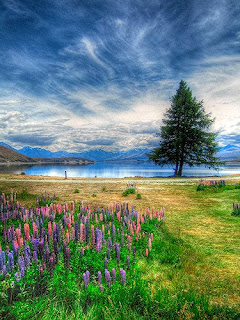
But before you start tweaking, you’ll need some images to play with: Series of images created from one image in Photoshop, final tone mapped HDR image at the end.
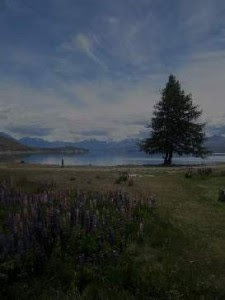
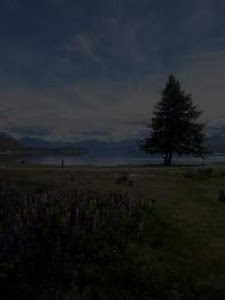
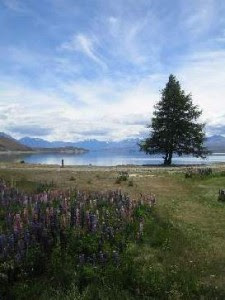
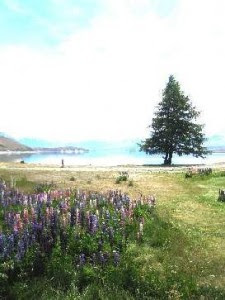
HDR (High Dynamic Range) images have been around for a while, but have seen a surge in popularity in the last few years, due in part to the increased availability of HDR imaging software like Photomatix. These types of software go some way to taking the pain out of the creation process, by aligning and combining images, leaving the photographer to tweak various settings to achieve the desired result.
But before you start tweaking, you’ll need some images to play with: Series of images created from one image in Photoshop, final tone mapped HDR image at the end.


An Introduction to HDR
Images taken with most cameras today can only capture a limited range of brightness without under-exposing or over-exposing the image. HDR imaging looks to increase this range by combining the dynamic range (brightness values from shadows to highlights) from a series of images of the same scene into one HDR image. You’ll probably find that the best candidate for an HDR image will contain a large dynamic range ie shadows and highlights, and a scene with a similar spread of brightness i.e. all shadows, or all highlights, will tend not to work so well as an HDR image.
Read the rest here: http://www.smashandpeas.com/hdr-photography/
Monday, March 16, 2009
Tripod alternative
OK, I know that some of you loathe tripods even though you know that photos taken with one are sharper and ou can use slower and more creative shutter speeds -- well, check this alternative out!
From smash and peas.com http://www.smashandpeas.com/gorillapod-flexible-tripod/
The Gorillapod, a flexible tripod made by Joby is an ideal piece of photographic equipment. With flexibility, it can be twisted into positions where a normal tripod wouldnt be able to reach. From winding around a tree to clinging to a rockface, the Gorillapod is a sure fire hit for the more adventurous photographer.
Get Yourself One
Joby Gorillapod for your point and shoot camera
Joby Gorillapod for your SLR
Joby Gorillapod for your SLR Zoom


From smash and peas.com http://www.smashandpeas.com/gorillapod-flexible-tripod/
The Gorillapod, a flexible tripod made by Joby is an ideal piece of photographic equipment. With flexibility, it can be twisted into positions where a normal tripod wouldnt be able to reach. From winding around a tree to clinging to a rockface, the Gorillapod is a sure fire hit for the more adventurous photographer.
Get Yourself One
Joby Gorillapod for your point and shoot camera
Joby Gorillapod for your SLR
Joby Gorillapod for your SLR Zoom


Sunday, March 15, 2009
Easy Photoshop Technique to Make Your Pictures Pop!
Easy Photoshop Technique to Make Your Pictures Pop! by Darren Rowse. This tutorial with photoshop techniques for making your images ‘pop’ has been submitted by Elise Hennen from 28 Studios.
blur/overlay
1. Duplicate your picture layer by dragging the layer to the ‘new’ icon in the layers palette (ctrl+j).
2. Apply a gaussian blur (Filter > Blur > Gaussian Blur…). Blur it enough that the detail disappears but the shapes mostly keep their form.
3. In the layers palette, change the blending mode from ‘Normal’ to ‘Overlay.’
4. If you look at the before and after, you can see that this method makes the light tones lighter and the dark tones darker while softening it a touch. Basically, it softly boosts the contrast. If you want a more dramatic effect, try changing the blending mode to ‘Vivid Light’ instead of ‘Overlay.’
Try it on all kinds of shots: portraits, nature shots, you name it. I use this method ALL the time. It works so well with everything!
Digital Photography School... Get more tutorials like this via with their free weekly newsletter.
blur/overlay
1. Duplicate your picture layer by dragging the layer to the ‘new’ icon in the layers palette (ctrl+j).
2. Apply a gaussian blur (Filter > Blur > Gaussian Blur…). Blur it enough that the detail disappears but the shapes mostly keep their form.
3. In the layers palette, change the blending mode from ‘Normal’ to ‘Overlay.’
4. If you look at the before and after, you can see that this method makes the light tones lighter and the dark tones darker while softening it a touch. Basically, it softly boosts the contrast. If you want a more dramatic effect, try changing the blending mode to ‘Vivid Light’ instead of ‘Overlay.’
Try it on all kinds of shots: portraits, nature shots, you name it. I use this method ALL the time. It works so well with everything!
Digital Photography School... Get more tutorials like this via with their free weekly newsletter.
Saturday, March 14, 2009
Exposure Fusion: What is it? How does it Compare to HDR? How Do I Do It?
From Digital Photography School
Exposure Fusion: What is it? How does it Compare to HDR? How Do I Do It?
Today Mark Evans from Smash and Peas Photography Blog shares an explanation and starting points with Exposure Fusion.Lets set things straight from the start, Exposure Fusion is not a kind of HDR. Exposure Fusion is a fairly new concept that is the process of creating a low dynamic range (LDR) image from a series of bracketed exposures.
In short, EF takes the best bits from each image in the sequence and seamlessly combines them to create a final ‘Fused’ image. Or more technically, the fusing process assigns weights to the pixels of each image in the sequence according to luminosity, saturation and contrast, then depending on these weights includes or excludes them from the final image. And because Exposure Fusion relies on these qualities, no exif data is required, and indeed, if you wanted to, you could include an image with flash to bring darker areas to life.
Using this process actually has a few advantages over HDR.
Read the whole article here: http://digital-photography-school.com/exposure-fusion-what-is-it-how-does-it-compare-to-hdr-how-do-i-do-it
Monday, March 9, 2009
Filters (all, but especially Graduated Neutral Density Filters)
This post is dedicated to James Santerre. I have the privilege of being in an exhibition with Jim (and some other wonderful photographers) right now at Cafe George on 300 George St in New Haven. I photographed with Jim recently on a CAP trip in DelMarVa and I was very impressed that even in frigid conditions he took out his split graduated neutral density filter. My Singh-Ray was in my camera bag, but I was too cold to bring it out (I was afraid that I would drop the expensive but amazing filter). I actually took a photo of Jim using the filter because I was impressed that amongst ALL of the great CAP photographers on this trip he was the ONLY one using one! (I also admit that even in good weather sometimes I get too lazy to take it out.)
Well, you MUST go see the exhibit at Cafe George because after you see Jim's photographs that are on display (mainly taken right here in Connecticut) you will either google right over to Singh-Ray OR if you already own a split graduated neutral density filter you will be inspired to take it out of your camera bag on your next trip! Jim has a great eye, which make his compositions sing, but his use of the split graduated neutral density filter really makes his photographs pop and sing! Kudos to Jim!
Perhaps we can entice Jim to do a workshop for us -- he could show us some "with" and "without" split graduated neutral density filter images and then discuss how and when he used them.
In defense of my admittance that my split graduated neutral density filter often stays in my camera bag I do use other Singh-Ray filters quite often and my Moose warming polarizer is on my camera lens 75% of the time. My favorite two Singh-Ray filters are the vari-ND filter. This is an AWESOME filter for photographing streams and waterfalls!! http://www.singh-ray.com/varind.html. I see now they also have a Vari-N-Duo adds our LB Warming Polarizer to the Vari-ND -- both in one versatile filter http://www.singh-ray.com/varinduo.html. That will certainly go on my wish list. You can download the signh-ray brochure here: http://www.singh-ray.com/brochure.html
Filters are one of the more useful items in a photographers bag of tricks. Although, not only useful, they also give a photographer that creative edge when attempting something original. There is a vast array of filters to fit any lens, and of course almost any purpose, but only a few stand out as must haves for most photographers. Read the rest of the article here: http://www.smashandpeas.com/filters/
Polarisers, Neutral density, and Graduated Neutral Density filters can be an extremely useful addition to any photographers kit, but unless you know what you’re doing, and know when and where to use them, you may end up with more duff shots than you thought.
Graduated Neutral Density filters are the Landscape Photographers best friend. Great for balancing exposure of the sky with the land, these bits of glass or plastic are indispensable, although when you’re first starting to use them, they can be a little tricky. First of all you’ll probably need a set of ND grads, I have a set of Hitec ND grads with soft graduations, which come in 0.3, 0.6 and 0.9 strengths, but you can also get hard graduations which basically graduate from clear to dark over a smaller area. Now when it comes to using them, you need to know what the difference in brightness between the sky and the foreground is, so that you can select the correct one to use and hence balance the exposure of the sky with the foreground. So for a 1 stop difference, you would use the 0.3 and for a 2 stop difference, use the 0.6, etc. To get the difference, you need to get the exposure for the sky, so point your camera at the sky (without the filter mounted). Lets say your camera is on Aperture Priority mode, set to f/16 and it gives you a shutter speed of 1/250s. You then point your camera at the foreground of your scene, and it gives you a shutter speed of 1/60s. From these settings, you can now see that the difference is 2 stops (1 stop from 1/250 to 1/125 and 1 stop from 1/125 to 1/60)and therefore you should use the 0.6 filter. All that is left is to compose the shot, align the filter so the graduation is in line with the horizon (dark part over the sky!) and take your picture. In tricky situations the use of a hand held light meter, such a Sekonic, might be needed but with a bit of experience you may even be able to guestimate which filter to use in most situations.
Read the rest here: http://www.smashandpeas.com/using-polarisers-and-nd-grads/
Well, you MUST go see the exhibit at Cafe George because after you see Jim's photographs that are on display (mainly taken right here in Connecticut) you will either google right over to Singh-Ray OR if you already own a split graduated neutral density filter you will be inspired to take it out of your camera bag on your next trip! Jim has a great eye, which make his compositions sing, but his use of the split graduated neutral density filter really makes his photographs pop and sing! Kudos to Jim!
Perhaps we can entice Jim to do a workshop for us -- he could show us some "with" and "without" split graduated neutral density filter images and then discuss how and when he used them.
In defense of my admittance that my split graduated neutral density filter often stays in my camera bag I do use other Singh-Ray filters quite often and my Moose warming polarizer is on my camera lens 75% of the time. My favorite two Singh-Ray filters are the vari-ND filter. This is an AWESOME filter for photographing streams and waterfalls!! http://www.singh-ray.com/varind.html. I see now they also have a Vari-N-Duo adds our LB Warming Polarizer to the Vari-ND -- both in one versatile filter http://www.singh-ray.com/varinduo.html. That will certainly go on my wish list. You can download the signh-ray brochure here: http://www.singh-ray.com/brochure.html
Filters are one of the more useful items in a photographers bag of tricks. Although, not only useful, they also give a photographer that creative edge when attempting something original. There is a vast array of filters to fit any lens, and of course almost any purpose, but only a few stand out as must haves for most photographers. Read the rest of the article here: http://www.smashandpeas.com/filters/
Polarisers, Neutral density, and Graduated Neutral Density filters can be an extremely useful addition to any photographers kit, but unless you know what you’re doing, and know when and where to use them, you may end up with more duff shots than you thought.
Graduated Neutral Density filters are the Landscape Photographers best friend. Great for balancing exposure of the sky with the land, these bits of glass or plastic are indispensable, although when you’re first starting to use them, they can be a little tricky. First of all you’ll probably need a set of ND grads, I have a set of Hitec ND grads with soft graduations, which come in 0.3, 0.6 and 0.9 strengths, but you can also get hard graduations which basically graduate from clear to dark over a smaller area. Now when it comes to using them, you need to know what the difference in brightness between the sky and the foreground is, so that you can select the correct one to use and hence balance the exposure of the sky with the foreground. So for a 1 stop difference, you would use the 0.3 and for a 2 stop difference, use the 0.6, etc. To get the difference, you need to get the exposure for the sky, so point your camera at the sky (without the filter mounted). Lets say your camera is on Aperture Priority mode, set to f/16 and it gives you a shutter speed of 1/250s. You then point your camera at the foreground of your scene, and it gives you a shutter speed of 1/60s. From these settings, you can now see that the difference is 2 stops (1 stop from 1/250 to 1/125 and 1 stop from 1/125 to 1/60)and therefore you should use the 0.6 filter. All that is left is to compose the shot, align the filter so the graduation is in line with the horizon (dark part over the sky!) and take your picture. In tricky situations the use of a hand held light meter, such a Sekonic, might be needed but with a bit of experience you may even be able to guestimate which filter to use in most situations.
Read the rest here: http://www.smashandpeas.com/using-polarisers-and-nd-grads/
Thursday, February 12, 2009
ADVICE “What is the Focal Point in this Picture?”
From http://digital-photography-school.com/
Using Focal Points in Photography
Posted: 01 Feb 2009 01:07 PM PST
Next time you take your digital camera out and line it up for a shot pause before you press the shutter button and ask yourself:
“What is the Focal Point in this Picture?”
Some other ways to ask the same question might include - What is the central point of interest? What will draw the eye of the viewers of this picture? What in this image will make it stand out from others? What is my subject?
The reason a focal point is important is that when you look at an image your eye will generally need a ‘resting place’ or something of interest to really hold it. Without it you’ll find people will simply glance at your shots and then move on to the next one.
Once you’ve identified a point of interest or focal point you then should ask yourself how you can enhance it.
6 Techniques to Enhance the Focal Point in an Image
A focal point can be virtually anything ranging from a person, to a building, to a mountain, to a flower etc.
Obviously the more interesting the focal point the better - but there are other things you can do to enhance it’s power including:
Position - Place it in a prominent position - you might want to start with the rule of thirds for some ideas.
Focus - Learn to use Depth of Field to blur out other aspects in front or behind your focal point.
Blur - If you really want to get tricky you might want to play with slower shutter speeds if your main subject is still and things around it are moving.
Size - making your focal point large is not the only way to make it prominent - but it definitely can help.
Color - using contrasting colors can also be a way of setting your point of interest apart from it’s surroundings.
Shape - similarly contrasting shapes and textures can make a subject stand out - especially patterns that are repeated around a subject.
Keep in mind that a combination of above elements can work well together.
Lastly - don’t confuse the viewer with too many competing focal points which might overwhelm the main focal point. Secondary points of interest can be helpful to lead the eye but too many strong ones will just clutter and confuse.
Using Focal Points in Photography
Posted: 01 Feb 2009 01:07 PM PST
Next time you take your digital camera out and line it up for a shot pause before you press the shutter button and ask yourself:
“What is the Focal Point in this Picture?”
Some other ways to ask the same question might include - What is the central point of interest? What will draw the eye of the viewers of this picture? What in this image will make it stand out from others? What is my subject?
The reason a focal point is important is that when you look at an image your eye will generally need a ‘resting place’ or something of interest to really hold it. Without it you’ll find people will simply glance at your shots and then move on to the next one.
Once you’ve identified a point of interest or focal point you then should ask yourself how you can enhance it.
6 Techniques to Enhance the Focal Point in an Image
A focal point can be virtually anything ranging from a person, to a building, to a mountain, to a flower etc.
Obviously the more interesting the focal point the better - but there are other things you can do to enhance it’s power including:
Position - Place it in a prominent position - you might want to start with the rule of thirds for some ideas.
Focus - Learn to use Depth of Field to blur out other aspects in front or behind your focal point.
Blur - If you really want to get tricky you might want to play with slower shutter speeds if your main subject is still and things around it are moving.
Size - making your focal point large is not the only way to make it prominent - but it definitely can help.
Color - using contrasting colors can also be a way of setting your point of interest apart from it’s surroundings.
Shape - similarly contrasting shapes and textures can make a subject stand out - especially patterns that are repeated around a subject.
Keep in mind that a combination of above elements can work well together.
Lastly - don’t confuse the viewer with too many competing focal points which might overwhelm the main focal point. Secondary points of interest can be helpful to lead the eye but too many strong ones will just clutter and confuse.
Friday, January 23, 2009
heavenly sunrises and sunsets anywhere
You can shoot heavenly sunrises and sunsets anywhere.
Written by Jeff Wignall on January 16, 2009
When I was in high school and beginning to get seriously interested in photography I had a powerful hankering (as John Wayne might say) to be out in the Wild West shooting scenic images of canyons and deserts and cow pokes (whatever they were) minding the range. Unfortunately, I was stuck in the 'burbs in Connecticut, and the wildest scenery I had available was a nearby beach on Long Island Sound. I soon discovered, however, that if I went to those beaches at the right time of day--sunrise or sunset--they would be magically transformed into splendid scenic settings. The wildness (or, in my case, tameness) of the location simply didn't matter: A great sunset is a dramatic and colorful event no matter where it occurs.
Read his tips and the rest of the article here...
http://www.creativepro.com/article/photo-how-gifts-sky
Written by Jeff Wignall on January 16, 2009
When I was in high school and beginning to get seriously interested in photography I had a powerful hankering (as John Wayne might say) to be out in the Wild West shooting scenic images of canyons and deserts and cow pokes (whatever they were) minding the range. Unfortunately, I was stuck in the 'burbs in Connecticut, and the wildest scenery I had available was a nearby beach on Long Island Sound. I soon discovered, however, that if I went to those beaches at the right time of day--sunrise or sunset--they would be magically transformed into splendid scenic settings. The wildness (or, in my case, tameness) of the location simply didn't matter: A great sunset is a dramatic and colorful event no matter where it occurs.
Read his tips and the rest of the article here...
http://www.creativepro.com/article/photo-how-gifts-sky
Thursday, January 15, 2009
Blogs that I follow
Someone recently emailed me and asked where I get my information...
Well...
everywhere that I can.
I subscribe to many different photo related newsletters, I read magazines, I visit websites, I subscribe to Blogs, photo newsletters, etc. etc.
So what are some my favorite Blogs?
Well...
everywhere that I can.
I subscribe to many different photo related newsletters, I read magazines, I visit websites, I subscribe to Blogs, photo newsletters, etc. etc.
So what are some my favorite Blogs?
- Photoshop Insider http://www.scottkelby.com/blog/
- David Ziser http://www.digitalprotalk.blogspot.com/
- MCP Actions http://mcpactions.com/blog/
- Perfect Picture School of Photography http://ppsop.blogspot.com/
- http://forum.montezucker.com/
- David duChemin http://www.pixelatedimage.com/blog/
- WildBird http://wildbirdonthefly.blogspot.com/
- David Tejada http://davidtejada.blogspot.com/
- I like keeping an eye out for these: http://photoshopdisasters.blogspot.com/
- Camera Dojo http://cameradojo.com/
- Barefoot Contessa Photo Adventures http://bcphotoadventures.blogspot.com/
and some of my favorite websites?
- NAPP http://www.photoshopuser.com/
- Nature Photographers Network http://www.naturephotographers.net/
- BirdPhotographers (more than birds) http://birdphotographers.net/forums/index.php
- Dpreview http://www.dpreview.com/forums/ and reviews http://www.dpreview.com/
- North American Nature Photography Association http://www.nanpa.org/
- National Geographic Magazine http://ngm.nationalgeographic.com/home
- Professional Photographer http://www.ppmag.com/
- Better Photo http://www.betterphoto.com/home.asp
- Photo Attorney http://www.photoattorney.com/
- DIY http://www.diyphotography.net/
- Camera Dojo http://cameradojo.com/
and my favorite email subscriptions...
- Tim Grey's DDQ http://www.timgrey.com/
- Birds as Art (Art Morris) http://www.birdsasart.com/
- Popular Photography http://www.popphoto.com/
- Weekly photo Tips http://weeklyphototips.blogspot.com/
- ProPhotoResource.com http://www.prophotoresource.com/
- Creative Daily New http://www.creativepro.com/
- Photoshop Lady http://www.photoshoplady.com/
- Photoshop Roadmap http://www.photoshoproadmap.com/
- Shutterbug http://www.shutterbug.com/
- PSD Learning http://psdlearning.com/
- Calumet eNews http://www.calumetphoto.com/
Sunday, December 21, 2008
8 tips for winter photography
Winter is a wonderful time for photography. Here is a site with a few tips to make photography in the cold more successful.
http://www.my-photo-blog.com/winter-photography-8-great-tips
This site has 8 tips with a paragraph explaining each one...
1. Keep your camera cold.
2. Keep your batteries warm.
3. Warm your camera slowly when you return home or in your car.
4. Keep your car cold.
5. Watch your breath (it's talking about exhalation, not bad breath)
6. Keep your tripod legs together in snow.
7. Use chemical hand warmers.
8. Wrap you tripod legs with pipe insulation.
http://www.my-photo-blog.com/winter-photography-8-great-tips
This site has 8 tips with a paragraph explaining each one...
1. Keep your camera cold.
2. Keep your batteries warm.
3. Warm your camera slowly when you return home or in your car.
4. Keep your car cold.
5. Watch your breath (it's talking about exhalation, not bad breath)
6. Keep your tripod legs together in snow.
7. Use chemical hand warmers.
8. Wrap you tripod legs with pipe insulation.
Monday, November 10, 2008
Tony Corbell Make Better Images with the Power of Light
Make Better Images with the Power of Light
"What [photographers] are struggling with is spending too much time at night fixing what they shot all day. So what I'm trying to make people understand with light quality and quantity, is trying to make sure that they capture the image it's supposed to be captured, the way they want it captured, the way they see it, and get it right the first time."
That's Tony Corbell—host of Calumet's newest Imagemakers DVD, acclaimed photographer and renowned educator—on helping photographers reassess the importance of commanding light. The Power of Light with Tony Corbell is a comprehensive study on using light to heighten the effect of your photos, while saving yourself from tedious post-process work. Corbell brings you inside his studio and takes you on location to demonstrate a number of different setups, from a traditional headshot to a dramatically lit shoot of an airplane. Throughout, he discusses theories of light quality that will help you conceive your own lighting schemes with ease.
For new photographers, this DVD establishes a foundation for lighting; for veterans, it can fill the foundation soundly.
Sunday, October 19, 2008
Nikon's "Look Good in Pictures" Photo Series
The videos are free and can be found on www.lookgoodinpictures.com
Nikon Launches Online How To Photo Series
Style expert and TV personality Carson Kressley Hosts Nikon's "Look Good in Pictures."
By Theano Nikitas October 10, 2008
Carson Kressley, currently the host of Lifetime's "How to Look Good Naked" and the style guy of the Fab Five from "Queer Eye for the Straight Guy" hosts Nikon's new online video series "Look Good in Pictures." Kressley will provide advice on how to look better when you're having your picture taken. Topics will cover a wide range of situations including how to look good for online dating photos, in vacation pictures, for the holidays and other common scenarios.
In the near future, you'll also get a behind-the-scenes look and watch as Carson accompanies political photographer John Harrington on the campaign trail and travels to the Hollywood Life: Style Awards to get tips from red carpet celebs.
From: http://www.popphoto.com/photonews/5599/nikon-launches-online-how-to-photo-series.html
Nikon Launches Online How To Photo Series
Style expert and TV personality Carson Kressley Hosts Nikon's "Look Good in Pictures."
By Theano Nikitas October 10, 2008
Carson Kressley, currently the host of Lifetime's "How to Look Good Naked" and the style guy of the Fab Five from "Queer Eye for the Straight Guy" hosts Nikon's new online video series "Look Good in Pictures." Kressley will provide advice on how to look better when you're having your picture taken. Topics will cover a wide range of situations including how to look good for online dating photos, in vacation pictures, for the holidays and other common scenarios.
In the near future, you'll also get a behind-the-scenes look and watch as Carson accompanies political photographer John Harrington on the campaign trail and travels to the Hollywood Life: Style Awards to get tips from red carpet celebs.
From: http://www.popphoto.com/photonews/5599/nikon-launches-online-how-to-photo-series.html
Create an Amazing Nike Logo
From Photoshop Lady
This tutorial is about creating a Nike Logo. It looks very simple. But, it is nice. It is always good to apply a little change on the existing logo or design as I mentioned in our previous tutorials. And, the your adjustment can, sometimes, make the original design to be surprising.
Friday, October 17, 2008
PAINTING WITH SHUTTER SPEED Noooooooo Tripods Allowed!
To read the rest of this interesting article and to see example of his technique visit:
http://ppsop.blogspot.com/2008/09/painting-with-shutter-speed-noooooooo.html
PAINTING WITH SHUTTER SPEED
http://ppsop.blogspot.com/2008/09/painting-with-shutter-speed-noooooooo.html
PAINTING WITH SHUTTER SPEED
Noooooooo Tripods Allowed!
Bryan F PetersonFounder/PPSOP www.ppsop.net

Until recently, the 'rule' of photography has been to "keep the horizon line straight and above all else, make sure its in focus". It was also unthinkable for a photographer to deliberately handhold their camera at a very slow shutter speed without the aid of a tripod. For those who did venture out of this 'norm', they were often scoffed at because the resulting images were of course "blurry and out of focus" and on more than one occasion the photographer was asked "were you drunk when you took that shot?"
Fortunately times have changed and the idea of "painting with a slow shutter speed" has been embraced. But, unlike panning, which is already challenging enough, painting with a slow shutter speed is a real "hit or miss" affair, BUT when everything does come together, it is truly rewarding. (Have you priced 'abstract art" lately? Doing it yourself is not only 'cheaper', but since you 'painted' it yourself, its also that much more rewarding.
Painting with shutter speed is a simple technique really. The challenge is in finding the 'right' subject to paint. Once you feel you have found a subject to paint, you simply set a correct exposure that will allow you to use, a 1/4 or a 1/2 second shutter speed, and at the moment you press the shutter release, you twirl, arch, jiggle, or jerk the camera in and up and down, or side to side or round and round motion; PRESTO an instant abstract painting! Just as Monet discovered with his brush and canvas, flower gardens continue to be the number one choice of photographers for painting with shutter speed, but don't overlook other compositional patterns as well, such as boat harbors, fruit/vegetable markets and even the crowd in the stands at the NFL football match. Also, consider painting with shutter speed in low-light where shutter speeds can range from 2 to 8 seconds-the difference here is that your movements are slower then the quick and hurried 'jiggle' mentioned above, and the resulting effect can look like that of an artist who uses a palette knife as the exposure time builds up one layer upon another.
Not much is required to create some truly exciting abstract paintings with your camera other then a slow shutter speed and the willingness to perhaps look 'foolish' in the presence of others. Defying all the 'laws' of photography, strangers stop momentarily as they find it odd to see you with your camera pointed at a given subject, jiggling, spinning, jerking and/or turning your camera while pressing the shutter release, and they cant for the life of themselves understand what on earth you could possibly be so happy about it. You may even perhaps give the impression that you suffer from a nerve disorder which would no doubt accounts for why you cant obviously hold the camera steady. Like I said, we do look foolish, but do we really care?
To read the rest of this interesting article and to see example of his technique visit:
http://ppsop.blogspot.com/2008/09/painting-with-shutter-speed-noooooooo.html
Fortunately times have changed and the idea of "painting with a slow shutter speed" has been embraced. But, unlike panning, which is already challenging enough, painting with a slow shutter speed is a real "hit or miss" affair, BUT when everything does come together, it is truly rewarding. (Have you priced 'abstract art" lately? Doing it yourself is not only 'cheaper', but since you 'painted' it yourself, its also that much more rewarding.
Painting with shutter speed is a simple technique really. The challenge is in finding the 'right' subject to paint. Once you feel you have found a subject to paint, you simply set a correct exposure that will allow you to use, a 1/4 or a 1/2 second shutter speed, and at the moment you press the shutter release, you twirl, arch, jiggle, or jerk the camera in and up and down, or side to side or round and round motion; PRESTO an instant abstract painting! Just as Monet discovered with his brush and canvas, flower gardens continue to be the number one choice of photographers for painting with shutter speed, but don't overlook other compositional patterns as well, such as boat harbors, fruit/vegetable markets and even the crowd in the stands at the NFL football match. Also, consider painting with shutter speed in low-light where shutter speeds can range from 2 to 8 seconds-the difference here is that your movements are slower then the quick and hurried 'jiggle' mentioned above, and the resulting effect can look like that of an artist who uses a palette knife as the exposure time builds up one layer upon another.
Not much is required to create some truly exciting abstract paintings with your camera other then a slow shutter speed and the willingness to perhaps look 'foolish' in the presence of others. Defying all the 'laws' of photography, strangers stop momentarily as they find it odd to see you with your camera pointed at a given subject, jiggling, spinning, jerking and/or turning your camera while pressing the shutter release, and they cant for the life of themselves understand what on earth you could possibly be so happy about it. You may even perhaps give the impression that you suffer from a nerve disorder which would no doubt accounts for why you cant obviously hold the camera steady. Like I said, we do look foolish, but do we really care?
To read the rest of this interesting article and to see example of his technique visit:
http://ppsop.blogspot.com/2008/09/painting-with-shutter-speed-noooooooo.html
Wednesday, October 15, 2008
The Hummingbird Guide
The Hummingbird Guide – How to Photograph Hummingbirds Using High-Speed Multiple Flash by LINDA ROBBINS with Arthur Morris
Linda Robbins began work on this guide in late 2007 and promised that it would be finished by February 1, 2008… As you might guess, it turned out to be a lot more work than Linda envisioned. We now have the first 100 CDs burned and ready to ship, and believe me, the guide was well worth waiting for.
There is a smattering of information available on line and in various books and publications, but never before has everything that you need to know to get started in this highly specialized field of photography been assembled in one place in a pleasingly designed, easy-to-read format. The guide is comprehensive in its scope; among the topics covered are choosing cameras and lenses, suitable tripods and tripod heads, choosing and purchasing suitable flashes, the needed equipment (flash stands, articulated arms, mini ball heads, etc.), choosing and setting up your feeder(s), how to create your artificial backgrounds, detailed, step-by-step instructions on setting up including flash and background placement, determining the right exposure, an explanation of the flash theory involved in high speed flash hummingbird photography, helpful odds and ends, digital and Photoshop considerations, the best rechargeable batteries and battery chargers, dealing with ants, bees and wasps at the set-up, dealing with the guarding birds that keep all others away from the set-up, the best photographic strategies including focus-acquisition tips, introducing perches to the set-up, and selecting flowers and adding them to the set-up. In addition, Linda writes eloquently on the topic of becoming addicted to high speed flash hummingbird photography (consider yourself fore-warned). Also included is an informative section entitled “About Hummingbirds.” Photographing perched hummers, creating pleasingly blurred images, and using macro lenses for hummingbird head-portraits are dealt with in photo-illustrated gallery format.
The section on needed equipment is especially impressive as Linda does a thorough job of exploring the variously priced options and lets you know exactly what she is using at present. The book is lavishly illustrated with both of our images (most of them, and all of the very best, are Linda’s.)
In truth, I cannot say enough in praise of this great new work. Linda is a skilled photographer and her hummingbird images are among the best you will see anywhere. And Linda is a skilled writer. I enjoyed both editing her words and authoring a section or two for the guide. Your purchase will include periodic free updates via e-mail PDF files.
You can order your copy of “The Hummingbird Guide – How to Photograph Hummingbirds Using High-Speed Multiple Flash” (on CD only) today for $50 plus $3 shipping and handling ($53 total) in the US. Florida residents need to add 7% sales tax: $53.50 plus the $3 shipping and handling ($56.50 total). To Canada the cost is $50 plus $6 shipping ($56 total). For overseas customers the cost will be $50 plus $8 shipping and handling ($58 total). A check made out to “Arthur Morris” and sent to us at BIRDS AS ART, PO Box 7245, Indian Lake Estates, FL 33855 is fine. As is a Paypal payment. Or, call us at 863-692-0906 with credit card in hand.
Whether you are just thinking about getting started in this field or have been doing it for years, there is tons for you to learn from Linda’s great new guide. We are proud to add it to the BIRDS AS ART information-in-digital-form line-up. Even better news for folks who can never envision spending big bucks on a flash set-up and traveling overseas with all that gear: Linda will be leading several high speed flash hummer trips to various South and Central American hotspots. All you need to do is bring a camera, lens, tripod, and tripod head and show up. Linda will have everything else that you need. Two photographers per set-up. For info write Linda at lindaasart@aol.com
Lastly, BAA Mail Order will be carrying most of the specialty items that you need to get started; details to follow.
Linda Robbins began work on this guide in late 2007 and promised that it would be finished by February 1, 2008… As you might guess, it turned out to be a lot more work than Linda envisioned. We now have the first 100 CDs burned and ready to ship, and believe me, the guide was well worth waiting for.
There is a smattering of information available on line and in various books and publications, but never before has everything that you need to know to get started in this highly specialized field of photography been assembled in one place in a pleasingly designed, easy-to-read format. The guide is comprehensive in its scope; among the topics covered are choosing cameras and lenses, suitable tripods and tripod heads, choosing and purchasing suitable flashes, the needed equipment (flash stands, articulated arms, mini ball heads, etc.), choosing and setting up your feeder(s), how to create your artificial backgrounds, detailed, step-by-step instructions on setting up including flash and background placement, determining the right exposure, an explanation of the flash theory involved in high speed flash hummingbird photography, helpful odds and ends, digital and Photoshop considerations, the best rechargeable batteries and battery chargers, dealing with ants, bees and wasps at the set-up, dealing with the guarding birds that keep all others away from the set-up, the best photographic strategies including focus-acquisition tips, introducing perches to the set-up, and selecting flowers and adding them to the set-up. In addition, Linda writes eloquently on the topic of becoming addicted to high speed flash hummingbird photography (consider yourself fore-warned). Also included is an informative section entitled “About Hummingbirds.” Photographing perched hummers, creating pleasingly blurred images, and using macro lenses for hummingbird head-portraits are dealt with in photo-illustrated gallery format.
The section on needed equipment is especially impressive as Linda does a thorough job of exploring the variously priced options and lets you know exactly what she is using at present. The book is lavishly illustrated with both of our images (most of them, and all of the very best, are Linda’s.)
In truth, I cannot say enough in praise of this great new work. Linda is a skilled photographer and her hummingbird images are among the best you will see anywhere. And Linda is a skilled writer. I enjoyed both editing her words and authoring a section or two for the guide. Your purchase will include periodic free updates via e-mail PDF files.
You can order your copy of “The Hummingbird Guide – How to Photograph Hummingbirds Using High-Speed Multiple Flash” (on CD only) today for $50 plus $3 shipping and handling ($53 total) in the US. Florida residents need to add 7% sales tax: $53.50 plus the $3 shipping and handling ($56.50 total). To Canada the cost is $50 plus $6 shipping ($56 total). For overseas customers the cost will be $50 plus $8 shipping and handling ($58 total). A check made out to “Arthur Morris” and sent to us at BIRDS AS ART, PO Box 7245, Indian Lake Estates, FL 33855 is fine. As is a Paypal payment. Or, call us at 863-692-0906 with credit card in hand.
Whether you are just thinking about getting started in this field or have been doing it for years, there is tons for you to learn from Linda’s great new guide. We are proud to add it to the BIRDS AS ART information-in-digital-form line-up. Even better news for folks who can never envision spending big bucks on a flash set-up and traveling overseas with all that gear: Linda will be leading several high speed flash hummer trips to various South and Central American hotspots. All you need to do is bring a camera, lens, tripod, and tripod head and show up. Linda will have everything else that you need. Two photographers per set-up. For info write Linda at lindaasart@aol.com
Lastly, BAA Mail Order will be carrying most of the specialty items that you need to get started; details to follow.
Sunday, October 12, 2008
Days are shorter, make your longer exposure count
DUSK and LOW LIGHT
1 SECOND AND BEYOND
LOW LIGHT AND NIGHT PHOTOGRAPHY
Make your longer exposure count, now that your days are shorter...
An excellent article by Bryan F Peterson/Founder of The Perfect Picture School of Photography http://www.ppsop.net/
It seems to be this unwritten rule that before the sun comes up or after the sun goes down that its really not possible for most shooters to get any good pictures. These same two reasons I hear today are the same two reasons I heard years ago; "there is not enough 'light', and/or "you need one of the more expensive cameras don't you?" or "I don't know how to get a meter reading." But clearly as the following images show there is ALWAYS enough light and getting a meter reading could'nt be easier as I will show you. Truth be told, I am convinced that the real reason most shoters dont venture out at night to shoot is because shooting at these hours of the day CAN interefere with one's lifestyle. (Just ask my wife and kids!)
Low light and night photography do pose special challenges, not the least of which is to use a tripod, (assuming of course you want to record exacting sharpness) and some degree of mathematical skills (simple adddition or subtraction) in some cases to come up with a correct exposure, but again, it is my feeling that the greatest hindrance in shooting the low light of predawn or at night is in the area of self-discipline. "It's time for dinner". (Next time pack a sandwich.) It's time to go to a movie." (Save your money and buy the movie when it comes out on DVD.) "It's time to go to a party." (Showing up an hour or two later, when everyone else has had a few glasses; now that's fun!") "I'm not a morning person." (Then don't go to bed the night before.) "It's time to watch my favorite television show". (You can tape it or use TIVO and see it after you're done shooting.) "My friends are waiting for me back at the car." (Make photographers your friends and they will gladly join you on the shoot.) "I'm all alone and don't feel safe." (Again, make photogrpahers your friends or join a camera club.) "I don't have a tripod." (Buy one!)
In my on-location workshops and in my on-line courses, students quickly learn just how much photographic opportunity exists before the sun comes up and after the sun goes down. And the rewards far outweigh the sacrifices. If it is one's goal to record compelling imagery, and it should be, then low light and night photography are two areas where compelling imagery abounds. With a little planning and a little forethought, you can soon find yourself in countless locations to shoot some show stopping exposures. Once you've arrived at a given location and conclude that this is where you will set up the only question remains is how to set the exposure for the upcoming 'light show'.With the sophistication of today's cameras and their highly sensitive light meters, getting a correct exposure is common place, even in the dimmest of light.
Yet this is an area where many photographers often find themselves under a cloud of confusion. "Where should I take my meter reading from? How long should my exposure be? Should I use any filters?"
In my years of experience in taking meter readings, there is nothing better nor more consistent then when taking a meter reading off of the sky; whether I am shooting backlight, frontlight or sidelight, whether I am shooting the first light of dawn or the last remnants of light at dusk.What should my exposure be when shooting in low light or at night? Now that's a really good question, but by now, you should know the answer or feel a lot closer to being able to answer it. Your exposure will be based on the very same principles of a creative exposure discussed already throughout this book. Does the scene present any motion-filled opportunities or are we simply shooting a classic skyline of some city, large or small? Either way, the principles of metering are the same in so far as where to take a meter reading from, BUT if there is motion involved, such as the flow of traffic, then you do have the option of setting an exposure that will render that flow of traffic as fluid streaks of color. For example, if one wishes to shoot a simple exposure, (and I really do mean simple) in manual exposure mode of a city skyline, set your aperture to f/8 and raise the camera to the dusky sky above the cityscape or landscape and adjust your shutter speed until a correct exposure is indicated and then return to your composition and press the shutter release. (It's important to note that its entirely possible that once you return to your composition, after you have set the manual exposure, that your meter may now indicate an underexposure, but just ignore it and shoot. The underexposure indicated is in response to what the meter 'see's' as dark buildings but in this case the meter has been fooled as the buildings really are not all that dark.)
For those of you who prefer to shoot scenes like this is in some kind of 'atuo-mode', e.g. Aperture Priority Mode, ditto on the use of f/8 and while pointing your camera to the dusky sky, hold your "exposure lock button" and then recompose and shoot. The exposure lock will 'save' the exposure for the dusky sky so when you shoot, it will be at the dusky exposure. Chances are in either case, and with 100 ISO, f/8 will render an exposure time of about two or four seconds. IF you are in fact shooting a motion-filled scene, than set your aperture to at least f/11 if not f/16, which in turn will increase your expsoure time from 2-4 seconds to 8-16 seconds. The longer the exposure time, the greater the amount of motion will be recorded.
PHOTO#1-#2-
What better place to try your hand at 'nightime' exposures then the greatest city on earth, New York! And a simple exposure too! With my camera and 17-55mm lens on tripod and with my ISO at 100, and my aperture set to f/8, I raised the camera to the dusky, partially cloudy sky above and adjusted my shutter speed until two seconds indicated a correct exposure. I then recomposed the scene and fired the shutter release and just like that, I had my dusky nightime exposure of the Big Apple. Because this scene did not present any real motion-filled opportunities, I did not find it necessary to increase my exposure time longer then two seconds. I have often 'caught' my students shooting an exposure like this with apertures of f/22 and exposure times of 15 seconds and when pressed as to the logic behind such a long exposure, they are hard pressed to give an answer since the 'same' exposure can be achieved at larger apertures (f/8) and shorter shuttter speeds (two seconds) in the absence of any motion-filled opportunities.Something to keep in mind, especially if you find yourself out shooting dusky scenes such as this with temperatures below freezing.
PHOTO#3-#4-#5-Part of the history in Lyon, France includes the work done by the Lumiere Brothers, both of whom are responsible for the birth of film. Not only could their invention, the Cinematograph, make a movie, but it could also project that same movie as well. Their first of more than 1400 films was shown in Paris in 1895 which showed a train pulling into a staiton and to some in the audience, this experience proved so frightneing that some went running for cover certain the train would come crashing into them.
For some years now, the City of Lyon has been holding a Lumiere Festival every Decemeber, partly in honor of the Lumiere Brothers and one main staple of the festival is the arrival from Germany of the largest Ferris Wheel on the European Continent. Situated at Place Bellcour for more than a month it does offer up numerous motion-filled opportunities, including the opportunity to incorporate this lone rider and horse statue against the background motion-filled ferris wheel.With my tripod mounted camera and 70-200mm lens set to f/11 and with my ISO at 100 I simply adjusted my shutter speed until four seconds indicated a correct exposure off of the dusky blue to the left of the ferris wheel. In effect, I metered this scene off of the dusky blue sky just like I did in the example shown of the New York City skyline.
I was now ready to shoot, BUT it certainly would'nt make any sense to shoot a four second exposure IF the ride was not moving, so I waited a few minutes for the ride to fill up with riders and soon it was making revolution after revolution and it was during this time I made a number of exposures, one of which you see here. And sure enough, I found myself taking a vertical composition as well, also at the correct exposure of f/11 at four seconds.
PHOTO#6-#7-San Francisco, Califronia, a city that many would swear is the ONLY city worth bragging about, but for me, it will always be a city that I could never quite get my head around. Don't get me wrong. I find San Francisco a shooters paradise, but try as I might, including live there, I could never embrace it as a city that I could call home. I am sure it will be one of those cities where even if I were to live there again, I would still feel that I was only visitor. From atop the steep incline on Treasure Island, a truly magnificient view of the city awaits. With my tripod mounted camera set to 100 ISO and 70-200mm lens, I chose an aperture of f/11 and with my camera pointed into the dusky blue sky to the right of the bridge, I adjusted my shutter speed until a corrrect exposure was indicated at four seconds. I returned the compositon you see here and fired away. At this slow shutter speed of four seconds I was able to record the slow but steady flow of traffic heading into the City by the Bay.
Of the many discoveries my students make in my on-location workshops it is the realization that many of their wonderful compositions that they create do in fact have additional photographic opportunities inside that frame. As idyllic this scene of San Francisco is, there is still yet at least one other dynamic image to be made, an image that is for the most part, resigned to strong graphic elements, primarily LINE and COLOR.
After switching my 70-200mm for my 200mm-400mm, I simply set the aperture to f/11 and for those same four seconds, compsed this vertical composition of just the bridge.Take a closer look on your next outing inside that viewfinder of yours and see if in fact you have another photographic opportunity to shoot. You might discover that you have been picking up your tripod and moving on to the next great shot a bit too premature.
PHOTO#8-For some men, (and women too I am sure) a scene like this speaks to the desire to simply get away from it all, out there in the wilderness for some long overdue solitude. No cell phones, no e-mails to check and no deadlines; just you and the sound of crickets and a crackling fire. With my tripod mounted camera set to 100 ISO and my 35-70mm lens I set my aperture to f/11 and pointed it to the pre-dawn sky above the camping spot and adjusted my shutter speed until a two second exposure indicated a correct exposure. Just like city lights, that campfire and the small Coleman lantern that is illuminating the inside of the ten, share a similar exposure value. Therefore, what that dusky sky indicates as a correct expsoure will be just as correct for the campfire and lighted tent and sure enough as this photograph shows, the overall exposure is spot on.
I feel the need to really stress what is meant by a dusky blue, sometimes magenta sky.It is a Western sky that is metered and photographed around 20-25 minutes after sunset or 15-20 minutes before sunrise and it is an Eastern sky that is metered and photographed around 15-20 minutes after sunset or 20-25 minutes before sunrise.
Saturday, September 27, 2008
Eddie Tapps' Pro Techniques
The Rebel - Something had to be done...
At the age of 16 he ran away from home to try and find what would make him happy. While searching for the meaning of his life, he found the hospitality of the Mobile, Alabama police department. When he was returned back to his parents, they sat him down with a guidance counselor and discussed what happened. It appeared he seemed happiest when he was photographing the snakes and turtles in the woods near his house, but can you make that into a career? The flash bulbs went off, he should be a photographer. So did this teenage rebel actually go on to live his dream and become a photographer?Yes… his name is Eddie Tapp.
To say Eddie Tapp is an accomplished Photographer is an understatement. Most people would get tired trying to read the list of his honors and achievements. In reality, you probably already know Eddie, because he tours all over the world teaching photographers about digital imaging. He was one of the first to teach Photoshop, and he can teach you a thing or five about it.
So for all you creative rebels out there. We are offering Eddie Tapps' Pro Techniques at its lowest price yet. It is chock full of the Photoshop techniques you absolutely need to know, like retouching, and creating soft focus, and color management (you know you need it). You will get to see why Eddie is one of the most in demand speakers in the industry.
For just one week you can get 30% Off. That is Pro Techniques 1&2 for under $132. Or get the whole shebang which includes Color Management for under $195. Just use the code REBEL when you check out, and remember if you ever are looking for something, Mobile is as good a place as any to find it.
Pro Techniques 1&2 >>
Pro Techniques 1&2 with Color Management >>
Here's what it's all about...
CLASSIC Pro Techniques 1
Working in Adobe Camera RawLearn how to use this powerful processing interface for RAW and Jpegs along with using the tools, adjustment tabs and controls, establishing important preferences and processing techniques.
Creating Custom Logo BrushesYou can learn how to create a custom logo brush.
Controlling Digital NoiseSee how to control digital noise that is caused by high ISO settings or under exposed images using the powerful Reduce Noise filter in CS3 along with Adobe Camera Raw.
90% Method of Color CorrectionLearn the best method of removing a color cast from an image by the numbers and how to keep the pixel data's integrity at its best.
Additional Color Correction TechniquesYou will learn color correction techniques from the simple method a histogram search to a more advanced masking technique.
Creating Subjective EnhancementsLearn techniques for subjective color and tonal enhancements.
Matching ColorsSee how to use the Match Color command in Photoshop CS3.
Shadow/Highlight & Exposure ControlsImplement the powerful Shadow/Highlight and Exposure controls in CS3.
RAW vs JPEGSee the difference between raw and jpeg when your white balance has the wrong setting.
and much more...
CLASSIC Pro Techniques 2
Color Borders & MoreLearn to make single and double color borders along with additional controls. Also included are multiple image borders and creating Actions.
Edge EffectsLearn how to create custom edge effects for your images by recording an Action and how to modify the Action for different edge effects.
Dream GlowMake great enhancement techniques by creating the Dream Glow action for Red, Green and Blue and various options for a beautiful enhanced image.
MZ Soft FocusCreate a beautiful Soft Focus filter that rivals soft focus from many years ago. Creating an Action for the enhancement technique also gives you many options and controls.
Cookie LightingLearn how to create very effective yet simple to do lighting techniques with any image.
Zoom EffectsSee a wonderful and effective enhancement technique to bring out different feelings from the same image. Advanced masking is also covered.
Rebuild TechniquesYou can learn how to create rebuilds from the very simple to more advanced methods with a series of image challenges.
Multi-Layer ProjectLearn a variety of multi-layer techniques including grouping, clipping and layer properties.
Smart ObjectsUse Smart Objects and gain much control with a variety of different projects.
PhotomergeLearn how to use a variety of Photomerge options in creating panoramas.
and much more...
Get the Tapp CLASSIC Combo setThis includes the above mentioned Pro Techniques 1 & 2plus
Classic Color Management
CLASSIC Color Management CS3with Eddie TappCoauthored by Rick Lucas (digital color expert)
Learn about all aspects of Color Management including Color Spaces, Color Temperature, White Balance, Device Calibration, creating Color Profiles, Managed Workflow, Actions, Camera RAW, Preferences and even working Color Management Scenarios.
Setting Color PreferencesLearn how to set up Color Preferences in Photoshop & Adobe Bridge along with managing various color spaces and profiles.
Introduction to Calibrating and Profiling DevicesThis session is the introduction of the two steps in stage 2 of a color managed workflow.
Calibrating and Profiling Input DevicesLearn the means and importance calibrating and profiling input devices, scanners and digital cameras.
Calibrating and Profiling Monitors and ProjectorsSee the techniques of calibrating monitors and projectors and how your profile becomes your System Profile.
Calibrating and Profiling Output DevicesIn this session you will learn how to calibrate and profile output devices such as printers.
Editing ICC ProfilesLearn how easy it is to edit the tone and color and output profiles.
Converting Profiles for OutputUse soft proofing in Photoshop along with the various options for converting your files for output profiles, including page layout, PDF files and the Internet.
and much more...
Pro Techniques 1&2 >>
Pro Techniques 1&2 with Color Management >>
All our titles carry a 20-day, unconditional satisfaction guarantee.Disc and On-Demand offer valid from Sept 22 to Sept 30, 2008.
Subscribe to:
Posts (Atom)