These links were recently posted in http://weeklyphototips.blogspot.com/ -- a great blog if you don't follow it!
If you have Adobe Photoshop CS6 (or are considering making the purchase) and
you want to get up to speed with it (or just want to know what's new and different
before you buy) we have a few resources here for you today.
1. The Photoshop
CS6 Launch Center from
Scott Kelby/NAPP
2.
Understanding Photoshop from
Richard
Harrington
3. The Adobe
Creative Suite Podcast from Terry White
4.
Photoshop Killer Tips with Mat Kloskowski
5.
Photoshop for Digital Photographers
6. Photoshop
User TV
7.
25 Best Photoshop CS6 Tutorials from Smashing HUB
8.
20+ Creative Adobe Photoshop CS6 Tutorials from PixelPetal
9.
Photoshop CS6 Tutorials: 30+ New Tips And Tricks from Designrfix
10.
Photoshop CS6 for Photographers with Chris Orwig
Friday, July 20, 2012


Quick Tip: Avoiding Dust while Changing Lenses

Quick Tip: Avoiding Dust while Changing Lenses
 Dust on the camera's sensor is a major issue in the
digital era. If you aren't careful, you will find yourself spending tons
of time cleaning up dust spots in the post production stage. With this
tip, I'm going to show you how to prevent the majority of dust before it
becomes a problem.
Dust on the camera's sensor is a major issue in the
digital era. If you aren't careful, you will find yourself spending tons
of time cleaning up dust spots in the post production stage. With this
tip, I'm going to show you how to prevent the majority of dust before it
becomes a problem.Great Smoky Mountains workshop


Great Smoky Mountains - Fall - Maxis Gamez, All Rights Reserved
Canon 5D MKII, Zeiss 21mm with Singh-Ray ND filter and polarizer @ f/16, 2 sec, ISO 50
Manual exposure, Induro CT414 Tripod
Canon 5D MKII, Zeiss 21mm with Singh-Ray ND filter and polarizer @ f/16, 2 sec, ISO 50
Manual exposure, Induro CT414 Tripod
Come and enjoy the beauty of the Great Smoky Mountains
during fall season. This workshop will allow you to learn how to create
powerful and dramatic images. I will guide you each and every step to
get it right the first time. Learn how to create images like the one
above with ease.
If you are interested, register by following this link. Great Smoky Mountains Workshop
Thursday, July 19, 2012
Redcoats & Rebels - August 4-5
 Redcoats & Rebels - August 4-5 Redcoats & Rebels - August 4-5
More than 800 Revolutionary War soldiers will converge on Old Sturbridge Village for the annual Redcoats & Rebels
event. This is one of the most popular events on the OSV calendar with
its large mock battles. And with free second day admission, you can pay
once and attend both Saturday and Sunday! Stay late on Saturday and see
the soldiers around the campfire. Watch a video or learn more.
|
 Save $5
 Print
this coupon and present it at the Visitor Center to receive $5 off one
regular daytime adult admission at Old Sturbridge Village. Limit one
coupon per party. Does not apply to education groups or group tours. Not
valid on previous purchases or combined with other offers.
Print
this coupon and present it at the Visitor Center to receive $5 off one
regular daytime adult admission at Old Sturbridge Village. Limit one
coupon per party. Does not apply to education groups or group tours. Not
valid on previous purchases or combined with other offers.www.osv.org Offer Expires 1/31/13- Coupon Code: News-1230
Leading the Eye with Lightroom and Photoshop ebook
Special Offer on PDFs
For the first six days only, if your readers use the promotional code DODGE8 when they checkout, they can have the FULL version of Dodge & Burn for just $8 OR they can use the code DODGE20
to get 20% off when they buy 5+ PDF eBooks from the Craft & Vision
collection. These codes expire at 11:59pm (PST) JULY 22, 2012.
Click here to view more details
Dodge & Burn Full Package
Leading the Eye with Lightroom and Photoshop

Do you want to add life and depth to your images? Dodge & Burn, Leading the Eye with Lightroom and Photoshop is an amazing eBook package (.zip file) that will guide you through the process of making the most out of your digital darkroom.
When editing your photographs, dodging and burning can produce that gentle push or pull of the eye so your viewer can zero in on everything your creative vision intended. It’s arguably one of the most important steps in post-processing and it’s as old as photography itself. Dodge & Burn is a comprehensive eBook (91-speads) about the tools and the techniques you need to quickly make editing your image files in Adobe Lightroom and Photoshop easier and more fun. Amateurs and vocational photographers alike will benefit from Piet’s insights, workflow, custom-built panel and matching action set, links to video resources, and special discounts on Nik Software.
What’s truly amazing about this offering is that it’s so much more than an eBook, it’s a package! The FULL package includes Piet’s custom EasyDodge Photoshop Panel (normally a USD $10 purchase on it’s own) and a matching user guide. On top of that, we’ve included 10 exercise files to go along with the tutorials in the eBook so you can practice on your own or go through the included history steps to see the post-processing unfold right in front of your eyes. EasyDodge is an amazing little piece of software, a custom Photoshop palette. To see it in action, watch Piet’s demo video on his website.
Lite vs. Full: This eBook offering comes into versions. If you want the “LITE” version of the EasyDodge Panel and do not want the 10 exercises files simply view the Dodge & Burn Lite Package in the main eBook library.
Software: The EasyDodge Panel only works with English versions of CS5/CS6, but even if you’re on a different version, the eBook explains the steps to take so you could make your own action set in your own language-specific version).
Adirondack Photography Weekend 20% off
Adirondack Photography Weekend
in partnership with Adirondack Life magazine
August 17-19, Lake Placid, New York

Get 20% off!
Registration extended!
Johnathan Esper added!
We're also happy to add new staff member Johnathan Esper to the list of presenters for this program. Johnathan's work is featured in the current issue of Adirondack Life.
We are extending the registration deadline and offering 20% off on registration fees. Don't miss the fun!
For more information about this program, click here.
|
|
Free Effects for ProShow 5 and Summer Wedding Style Guide
Thanks Gary for passing this along!
Free Effects for ProShow 5 and Summer Wedding Style Guide
An abundance of sunshine and outdoor activity sets the tone for summer wedding style — a mixture of clean, vibrant colors + un-stuffy patterns and fonts. Play up these elements in your summer slideshows with our style guide and free effects for ProShow 5.

Wednesday, July 18, 2012
for sale -- Canon 40D Digital SLR Body, plus Box and contents (used, no lens)
For sale -- Canon 40D Digital SLR Body, plus Box and contents (used, no lens) $375
Email Lisa at photographer67@comcast.net
Email Lisa at photographer67@comcast.net
| Product Information | ||||
The Canon EOS 40D is a 10.1 MP camera with a 3-inch LCD screen that is packed with advanced technologies to deliver photographs of remarkable quality. It is compatible with over 60 EF and EF-S lenses, and all EX Series Speedlite flash units letting you choose a lens with desired focal length to suit the requirements. The Canon DSLR camera is powered by a DIGIC III Image Processor, enriching images with rich tonal reproduction and helping you to capture colorful images effortlessly. The Canon EOS 40D has a 22.2 x 14.8 mm CMOS image sensor that minimizes image noise while capturing photos at higher ISO settings for enhanced quality. With a TTL 35-zone SPC sensor and a 9-point AF system in the Canon DSLR camera, you can accurately focus on fast-moving objects even in poor light conditions. The Canon EOS 40D supports high resolution video recording, letting you record glorious moments of your life in HD quality.
| ||||
Tuesday, July 17, 2012
For sale -- Canon camera, lens and Epson printer
Canon EOS 5D $550 - L bracket $75. Comes with batteries, charger, remote cord, etc.
Canon telephoto Tilt Shift TS-E 90mm, f2.8 lens, manual focus, hardly used. Lists for $1299. My price $700.
Epson Stylus 2200 printer with inks and 4 extra cartridges, $350.
contact mindseyebv@comcast.net or 203 488-4688
Barbara
Photograph the Moon with Different Lenses
Photograph the Moon with Different Lenses
OK, you have to read this article!!!
Why...
well, of course the moon is cool
but this article really shows WHY you need a good lens. It will make you realize that it is not about the body but really about the glass. I am not even talking the magnification of the lens, although he does show that, I am talking about the QUALITY of the glass -- L lenses ROCK!
Bottom line...consumer lenses are much worse than L lenses and zoom lenses are worse than fixed focal length lenses...
The article also shows a great RAW vs JPG comparison...
He also shows the effect of filters, especially on certain lenses. I do use filters, and they have saved several expensive lenses from catastrophe for both Tom and myself, but perhaps I do need to take them off sometimes...sigh...once you see figures 8a and 8b you will see why I sigh...
He also shows fixed lenses versus zoom lenses. This part was not as depressing because it feeds into our need to buy more lenses, LOL.
Lisa
These two paragraphs say a lot, but you have to read his whole article and see the photos!
Fixed Focal Length versus Zoom Lenses
"People often choose zoom lenses for their convenience without realizing many zoom lenses are a compromise in image quality. The Canon 100-400 mm L IS lens is very popular with wildlife photographers. Here are results from my 100-400 versus a 300 mm f/4 L IS lens. In both cases, the moon was imaged on the same tripod with the same camera a few minutes apart using mirror lock-up, cable release (TC-80N3) and IS was off. Exposure was 1/200 second at ISO 200, f/5.6. Neither lens had any filters on the front. The 300 f/4 L IS with a Canon 1.4x TCII teleconverter produces sharper images than the 100-400 at 400 mm, Figure 10. "
Fixed focal length L lens versus a consumer zoom
"Figure 12. The 300 mm f/4 L IS lens versus a consumer zoom. Clearly, the fixed focal length lens is much sharper than the consumer zoom. Camera body was the same, a Canon 5D Mark II and the images were taken a few minutes apart. Five images at each setting were obtained with manual exposure, mirror lock-up, IS off, using a carbon fiber tripod. The best image for each setting was selected for this presentation, although there was little difference within each set. The images were converted from raw files using the same settings. Note the 300 f/4 L lens at f/4 is significantly sharper than the consumer zoom at f/8, a 2 stop advantage."
Basic Image Enhancement with Your Computer
Basic Image Enhancement with Your Computer
with Nancy Ori |
|
July 22, 2012, 11AM-5PM...this Sunday
You have a lot of photos. Now what?
This
workshop will provide you with an introduction to the magic of image
manipulation and enhancement. In just one session you will be able to
give your digital images the finished look that can only be achieved
with good post-processing. Life at the computer does not have to be
overwhelming, fearful, complicated or long. Start making better photos
immediately. This fun and very visual workshop experience will cover a
lot of simple
 techniques and tips to dramatically improve the communication of every
one of your images. It is designed for those students who have not done
image manipulation and need a check list to get started.
techniques and tips to dramatically improve the communication of every
one of your images. It is designed for those students who have not done
image manipulation and need a check list to get started.
The
morning session includes a lecture with a slide show illustrating how
understanding good composition can drive your images through a variety
of techniques to perhaps the most powerful one of all: cropping. Nancy
will describe how to manipulate a series of situations and why each
technique was used while working with simple programs. Students will
learn about organizing files, image enhancement and the basics of using
simple imaging software to produce better photographs quickly and
easily. The relationship of the image to the selection of paper and
printing options will also be covered in order to explore more creative
approaches. Importing, resizing, storing and emailing will also be
covered.
 The afternoon session will involve looking at and manipulating images
that you bring with you on a travel drive, camera card or CD. Please
choose 2-3 images in JPEG format. You may also bring prints in any size
in order to share your images with the group. This is a demonstration
session showing how the instructor would simply and quickly enhance your
images with easy techniques and software. Something can be learned from
every image. The workshop also covers practical concerns such as where
to find the best and most affordable equipment, materials, and
commercial printing and scanning services available. Students should
bring a notebook, a couple of images and lunch.
The afternoon session will involve looking at and manipulating images
that you bring with you on a travel drive, camera card or CD. Please
choose 2-3 images in JPEG format. You may also bring prints in any size
in order to share your images with the group. This is a demonstration
session showing how the instructor would simply and quickly enhance your
images with easy techniques and software. Something can be learned from
every image. The workshop also covers practical concerns such as where
to find the best and most affordable equipment, materials, and
commercial printing and scanning services available. Students should
bring a notebook, a couple of images and lunch.
Some of
the things you will also learn: how to crop, straighten, remove spots,
flaws and red eye, fix shadow and highlight problems, adjust contrast,
correct color casts, darken skies, increase color saturation, convert
color images to powerful black and white, and sharpen the final image. Laptops are not required but might be helpful if you have one that already has a manipulation program loaded on it. Everything we do will be projected so you can clearly see what is happening.
Very small group. Lots of attention.
|
Scott Kelby all-day seminar on Photoshop CS6 NYC
Scott Kelby is giving an all-day seminar on
Photoshop CS6 for Photographers at the Javits Center in NYC on Monday,
July 30. If you’ve never heard Scott, he is one of the best instructors
out there, and is quite entertaining. Scott is the head of NAPP – the
National Association of Photoshop Professionals.
Mon., July 30, 2012
The Adobe Photoshop CS6 for Photographers Seminar Tour
Full-day program by Scott Kelby
Javits Center, NYC
$99; $79 for NAPP members
Please contact Rick Sereque if you have registered and are interested in going down with him!!
rsereque@ix.netcom.com
Monday, July 16, 2012
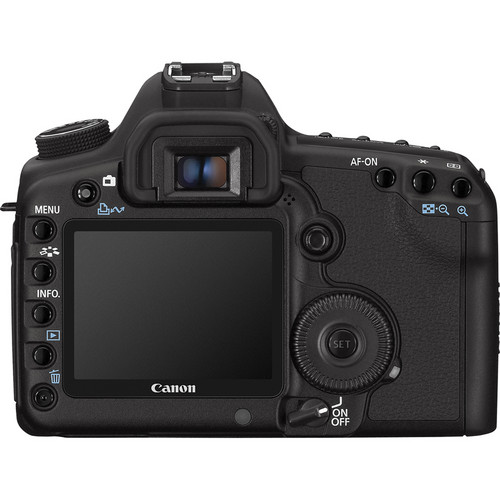
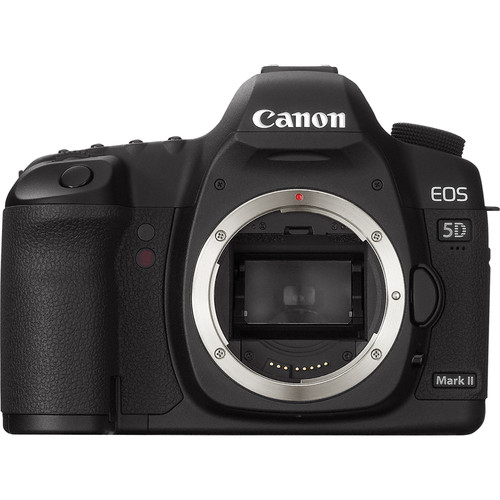
Canon 5D Mark II for sale
For sale, please email Lisa at photographer67@comcast.net
·
Canon
5D Mark II $1650
o In excellent condition with a ZAGG cover on the LCD, Custom functions for HDR set
up
o Purchased on Dec 31st for $2499, they sell new for $2079.
o We have the
box, all box contents (battery, charger, etc) (no memory card)
o 21.1 Megapixel Full-Frame Sensor
o 3.0"
High Resolution LCD Display
o Live View
Mode, 1080p Movie Mode
o Dust &
Weather-Resistant, Self Cleaning Sensor
o Broad ISO
Range (50-25600)
o 3.9 fps
Burst Mode
·
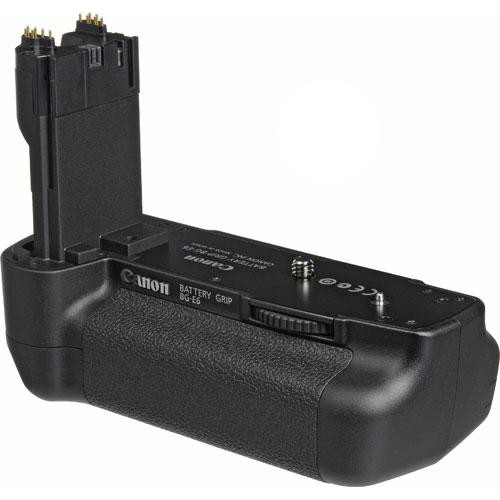
Canon BG-E6 Battery Grip $150
o In addition to the extra battery power, the BG-E6 provides full vertical
shooting controls, new $235
Getting Up Close with Close-Up Lenses
Getting Up Close with Close-Up Lenses
"This is the first in a series of four lessons on close-up and macro photography by Andrew S Gibson, author of Up Close: A Guide to Macro & Close Up Photography. While macro lenses undoubtedly give you the best image quality (I’ll cover macro lenses in detail in a later lesson) not everybody wants to, or has the budget, to buy one. So first I’m going to explore some relatively inexpensive ways to try out close-up and macro photography. "
"My favourite accessory for getting up close is a close-up lens (the Canon 500D close-up lens is pictured above). A close-up lens, while technically a lens, looks more like a filter and screws into the front of your lens the same way. For this reason they are also called close-up filters or supplementary filters. Close-up lenses work by reducing the minimum focusing distance of your lens. You can focus more closely to your subject, which gives you greater magnification. "
Read the entire article here:
"This is the first in a series of four lessons on close-up and macro photography by Andrew S Gibson, author of Up Close: A Guide to Macro & Close Up Photography. While macro lenses undoubtedly give you the best image quality (I’ll cover macro lenses in detail in a later lesson) not everybody wants to, or has the budget, to buy one. So first I’m going to explore some relatively inexpensive ways to try out close-up and macro photography. "
"My favourite accessory for getting up close is a close-up lens (the Canon 500D close-up lens is pictured above). A close-up lens, while technically a lens, looks more like a filter and screws into the front of your lens the same way. For this reason they are also called close-up filters or supplementary filters. Close-up lenses work by reducing the minimum focusing distance of your lens. You can focus more closely to your subject, which gives you greater magnification. "
Read the entire article here:
Sunday, July 15, 2012
10 Ways the Navigator Panel in Lightroom Will Save Time for You
10 Ways the Navigator Panel in Lightroom Will Save Time for You
In Lightroom, the Navigator Panel is usually the first one you see. It’s at the top left corner. It ROCKS, if you know what to do with it, and can really speed up your editing time. Here are my favorite uses:
34th Annual South County Hot Air Balloon Festival
34th Annual South County Hot Air Balloon Festival, one of Yankee Magazine's TOP 20 Summer Events in Rhode Island

http://www.southcountyballoonfest.com/
http://www.southcountyballoonfest.com/
Friday, July 20
| 6:30pm – 8:30pm | John Cafferty and the Beaver Brown Band - RAIN OR SHINE - Free w/ admission |
| 7:00pm – 9:00pm | Hot Air Balloon Glow @ Dusk |
| 7:00pm | Hot Air Balloons Fly and Tethered Balloon Rides Begin (Weather Permitting) |
Saturday, July 21
| 5:30am | Balloon Weather Briefing |
| 6:00am | Hot Air Balloons Fly and Tethered Balloon Rides (Weather Dependent and Time is Approximate) |
| 7:00pm – 9:00pm | Hot Air Balloon Glow At Duskl w/ Music By Wakefield Concert Band (Weather Permitting) |
| 7:00pm | Hot Air Balloons Fly and Tethered Balloon Rides Begin (Weather Permitting) |
| 9:00pm | FIREWORKS!!! w/ Music by Wakefield Concert Band |
Sunday, July 22
| 5:30am | Balloon Weather Briefing |
| 6:00am | Hot Air Balloons Fly and Tethered Balloon Rides (Weather Dependent and Time is Approximate) |
| 7:00pm | Hot Air Balloons Fly and Tethered Balloon Rides Begin (Weather Permitting) |
Canon Mirrorless Camera Rumored for July 24 Unveiling
Rumors of a Canon mirrorless camera are heating up with July 24 being the unveiling date, according to Canon Rumors.
The camera is further rumored to use a different mount than the current EF and EF-S DSLRs. An increasingly popular theory is that the upcoming mirrorless line of cameras will adopt the Canon G1 X sensor format, which equates to a roughly 1.85x crop factor. This is larger than both the Nikon 1 Series (at 2.7x) and the Micro Four Thirds standard (at 2x).
Read the rest here: http://www.photographybay.com/2012/06/25/canon-mirrorless-camera-rumored-for-july-24-unveiling/
The camera is further rumored to use a different mount than the current EF and EF-S DSLRs. An increasingly popular theory is that the upcoming mirrorless line of cameras will adopt the Canon G1 X sensor format, which equates to a roughly 1.85x crop factor. This is larger than both the Nikon 1 Series (at 2.7x) and the Micro Four Thirds standard (at 2x).
Read the rest here: http://www.photographybay.com/2012/06/25/canon-mirrorless-camera-rumored-for-july-24-unveiling/
Saturday, July 14, 2012
Yosemite HD – Shot on the 5D Mark II
Yosemite HD – Shot on the 5D Mark II
Here’s a nice timelapse short that further demonstrates that the 5D Mark II (even after it’s recent price drop) has still got it. It’s worth hitting the full screen in HD for the 4 short minutes it takes.
Friday, July 13, 2012
Photos of the Western US Wildfires Taken from Space
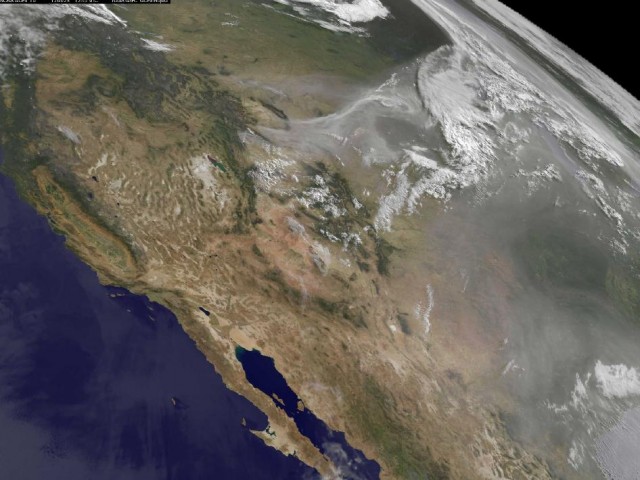
NASA satellites and astronauts are capturing some compelling images from space that show just how massive the wildfires in the western US have become. [click to continue…]
Subscribe to:
Posts (Atom)