Sunday, August 19, 2012

Great Smoky Mountains Workshop


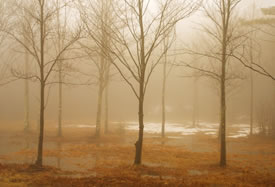
Great Smoky Mountains HDR - Fall - Maxis Gamez, All Rights Reserved

Canon 5D MKII, Zeiss 21mm, 3 images HDR (+2, 0, -2) @ f/11, ISO 50, Manual exposure, Tripod
Come and enjoy the beauty of the Great Smoky Mountains during fall season. This workshop will allow you to learn how to create powerful and dramatic images. I will guide you each and every step to get it right the first time. Learn how to create images like the one above with ease. I will also be talking about how I create my HDR images targeting a more "natural" look to it.

If you are interested, register by following this link. Great Smoky Mountains Workshop

Saturday, August 18, 2012

20 Beautiful Blue Hour Photos


The finalists in the Blue Hour Photo Challenge demonstrate how patience pays off
Every month we challenge our talented readers with a topic to photograph. June's topic was the elusive blue hour. The results, as always, were wonderful. Each image is a great reminder of how patience can truly pay off when you're behind the camera.
PopPhoto

"Urban Landscape" - Submission Deadline 8/29


The Center for Fine Art Photography
Urban Landscape - Call for Entries
Submission Deadline August 29
  Image Credits:  We Were to Meet Here © Marko Susla, Brea & Barbara, Fullerton, CA © Brad Moore, Lunar Moth © Angela Faris Belt, Disneyland Paris © Alexander Heilner, Stag Rock Study © Steen Dossing, Surveying the Green © Richard Saxon

Entries Due: August 29, 2012
Notice of acceptance: September 7, 2012
Exhibition dates:  November 30, 2012 - January 5, 2013


Juror: Julia Dolan currently holds the Minor White Curator of Photography title at the Portland Art Museum.
Awards:
Juror's Award: $600.00
Director's Selection: $250.00 
liveBooks Website Awards: Two websites valued at $399.00
Blurb Award: Valued at $250.00
Sponsors
Blurb      liveBooks Odell Brewing Company Logo        Fort Fund
 

The Center for Fine Art Photography
400 North College Ave. | Fort Collins | CO | 80524

Take the pain out of preparing contest entries.


Take the pain out of preparing contest entries.

This Photoshop tool prepares entries for final submission to online competitions. It has a bunch of cool stuff built in, but the coolest is something nothing else can do: automatically save at a specific size in kb. That's right: no more manual Save for Web. Interested? Read on.

Contests are fun. Contest prep is not.

Contest entries for online competitions come in many varieties, but they all have a few requirements in common: they all have requirements for the width and height of entries, and they all limit the size of your submitted files.
Now the first part of those requirements is easy enough to put into an action. But saving at a specific file size? Nope. And that means all kinds of clicking in the Save for Web dialog. And to add insult to injury, it just can't be automated. Until now.

Contest Preppie FTW!

Contest Preppie has all kinds of automated goodness baked right in: metadata stripping, sharpening, colourspace conversion and customization via actions. And of course, image resizing and the all-important ability to save your images at the maximum possible quality while staying within the limits required by the contest. It just doesn't get any easier.

It's easy on the eyes, too.

All this and a bag of chips

Contest Preppie will run on the currently open and active file, or will process all the files you select in Bridge.
The Resize Settings are supplied by the contest you are entering: just plug them in and Contest Preppie will do the rest.
Extra options for processing your images include:
  • Metadata removal for security and increased file efficiency;
  • Colourspace conversion to ensure colour accuracy on the widest number of displays;
  • Unsharp Mask to give your images a bit of a pop;
  • And if you have your own Secret Sauce for final image preparation (and I know you do!) just call the action and you're good to go!
And files are saved wherever you like, ready to go. Could this be any easier?
http://www.photoshoptools.ca/ContestPreppie.html

CPW upcoming workshops

Leap into Fall at CPW with these upcoming workshops!

Friday, August 17, 2012

How to Create Realistic Tears in Photoshop


How to Create Realistic Tears in Photoshop

Upcoming Workshops by Nancy Ori

Upcoming Workshops
nancyori@comcast.net
Nancy Ori
New Jersey Media Center LLC


Sept 11 evening lecture on lighting and exposure and Sept 12 all day field trip to Eastern State Prison in Philly $130 includes tuition, entry fee and tripod fee

Sept 15  Embracing Natural Light Garden Field Trip (rain date Sept 22)

October 5-12 Delicious Photography in Italy

Join us for a week of fun and photography in our little hilltop town. We will be visiting Tuscany and Umbria with every day being our own adventure. Great food, great opportunities for images and even lots for the significant other. I have been told that this is a once in a lifetime trip. Everyone who has gone with me absolutely loved it. This is my fourth workshop at this location. It is a great place and doesn't make any sense to go anywhere else.
Contact me for a complete flyer on what is included and registration information.
Workshop fee: $2950
CONTACT ME


Thursday, August 16, 2012

Saving JPEG Photos Hundreds of Times


Saving JPEG Photos Hundreds of Times

"Most of you probably know that JPEG is lossy compression method, meaning compression permanently throws out data and detail. Luckily, a typical compression can save 10 times the space of an uncompressed image without sacrificing much noticeable quality. However, if the image is repeatedly compressed and saved, artifacts introduced during compression become more and more obvious."

Reddit member Grundle decided to see what repeated compression looks like by saving the same image over itself 500 times at high quality (10/12 in Photoshop). He then combined the images into the following video:


10 months ago another Reddit member elezeta did the same experiment, compressing a JPEG 600 times:


I think it’s pretty clear why you should always work with RAW files if you care about the quality and longevity of your work. Every time you save those JPEG photographs, you lose a little piece of awesomeness.

From : http://www.petapixel.com/2010/02/04/saving-jpeg-photos-hundreds-of-times/

JPEG is a “lossy” compression algorithm

Friends don't let friends shoot JPG. At least shoot RAW plus JPG! Lisa

http://www.petapixel.com/2012/08/14/why-you-should-always-rotate-original-jpeg-photos-losslessly/

"JPEG is a “lossy” compression algorithm that’s geared towards storing and sharing photos without taking up too much disk space. Rotating these compressed images is usually done by decompressing, rotating, and then re-compressing. Since the re-compression is lossy (i.e. data is thrown away), this process results in slightly degraded photos (hence that warning)."


If you’re not convinced, check out this interesting experiment done by a Wikipedia user named Burny. Using a simple computer script, he took the following image and rotated it lossily 2000 times:
Why You Should Always Rotate Original JPEG Photos Losslessly 0 mini
Here’s hows the image degraded through those 2000 rotations:
Why You Should Always Rotate Original JPEG Photos Losslessly 200 mini
Why You Should Always Rotate Original JPEG Photos Losslessly 500 mini
Why You Should Always Rotate Original JPEG Photos Losslessly 900 mini
Why You Should Always Rotate Original JPEG Photos Losslessly 2000 mini
Pretty crazy, huh?

http://www.petapixel.com/2012/08/14/why-you-should-always-rotate-original-jpeg-photos-losslessly/

New PDF eBook -- Finding Focus, Understanding the Camera's Eye

Download Nicole S. Young's latest PDF eBook Finding Focus for just $4

Nicole S. Young's Finding Focus eBook is Available for USD $4
New PDF eBook
Finding Focus, Understanding the Camera's Eye is an invaluable resource for photographers who want to further develop their technique of on-camera and post-production focus. Finding the best expression of your photographic vision can only happen when your working knowledge and skills produce images that direct the viewers' eye to what you intended. This beautiful eBook is for photographers of any level and you can expect to immediately benefit from Nicole's in-depth analysis of aperture, depth of field, camera settings, lenses and lens compression and editing.


"FINDING FOCUS will help you make sharper photographs, but more than that it'll help you make photographs that help you tell a stronger story and achieve the aesthetic you're hoping for in your photographs." - David duChemin.

This ebook merges together the best of both worlds: the Artist and the Geek. Nicole's insights and hands-on advice zeros you in on the advanced focusing techniques you need to photograph subjects of all kinds (people, groups, animals, still life, macro, landscapes) while at the same time leveraging the element of focus to further develop your visual storytelling.

Then the software gets its turn as she unpacks how to best use sharpening tools in Adobe Photoshop and Lightroom and use advanced techniques, like focus staking and adding blur, to your advantage. All of this is backed-up by easy to understand illustrations and detailed descriptions. And no stone is left unturned as Nicole addresses common mistakes helping you make quick work of making clear and stunning photographs.

Nicole S. Young is a full-time photographer and author specializing in food and stock photography, licensing her images through iStockphoto and Getty Images. She's an accredited Adobe Certified Expert (ACE) in Photoshop CS5 and has authored print books through Peachpit Press (Canon 7D: From Snapshots to Great Shots, EOS Canon 60D: From Snapshots to Great Shots and Food Photography: From Snapshots to Great Shots).


Special Offer on PDF eBook
The retail price on this power-pack PDF eBook is USD $5, but for the next six days, use the promotional code  FOCUS4  when you check out so you can have Finding Focus for just $4 OR use the code  FOCUS20  to get 20% off when you buy 5+ PDF eBooks from the Craft & Vision collection. These codes expire at 11:59pm PST August 19, 2012.

Author Bundle
Buy both of Nicole's C&V eBooks: Finding Focus and (micro)STOCK for 20% off - visit her author page to get these two PDFs  for just USD $8. 

Perseid meteor shower photos

Perseid meteor shower photos

Image credit: Snowy Range Perseids Meteor Shower by David Kingham

This is What You Get When You Stack Photos of a Meteor Shower shower mini

Read how he did it here

Wednesday, August 15, 2012

Looking For A Place To Post Your Macro Images?


Looking For A Place To Post Your Macro Images?

Mike Moats has the places for you

If you are a macro photographer and looking for some cool spots to show off your images, I’ve got places set up for you to post. You will see tons of great images being posted, and along with the eye candy you will also learn things about subjects to shoot, ways to compose, how people process their images, and build relationships with other macro geeks.

If you like shooting macro abstracts or soft focus flowers and just flora macro in general try my facebook group. Macro Abstracts/Flowers Group

If you are into shooting bugs and small critters join this facebook group.Macro Critters Group

If you like shooting macro subjects other then in nature I have a facebook group for you. No Nature Macro Group

If you want critiques on your macro images join this group on facebook. Macro Critique Group

Lets say you are not on facebook but still want to have fun posting your images and learning new stuff. I got just the site for you. Now this site is only for nature lovers. You can post images in different forums, and join discussions on general macro photography. Check out my Macro Nature Forum

Join one or two or all of them, but please read the about pages on the facebook group so you know the guidelines 

Macro Photography Workshop with Roman M. Kurywczak


Macro Photography Workshop with Roman M. Kurywczak
Indoor flowers and still life set ups to make stunning close up images
Sunday, Sept 9th in Stratford, CT Two sessions -- 9-12 and 1-4

This in-depth Q&A macro photography lecture will show you the technical tips and tricks needed to take your macro photography to the next level!  Many people are comfortable with creating shallow focus macro images but I will show you how to achieve consistently sharp images with maximum depth of field all in a single frame!!!  Topics covered will range from gear to specific settings for you to maximize your time spent out in the field. Overcoming distracting backgrounds will be discussed in depth with photographic examples showing you how easy they are to overcome.  The use of natural light will be covered but a heavy emphasis will be placed on using flash correctly in the field to properly balance the exposure and achieve dramatic results.  We will look at some frequently used tricks by the pros that you can easily apply in the field to quickly improve your macro skills.  Many of these tips and tricks are inexpensive and can be done using the gear you already own!  You can ask questions to ensure that you go home with a better understanding of all the topics covered in the program and create tack sharp macro images of your very own.


After the presentation, Roman will guide the participants through the 4 set-ups and show them how to use their own gear to get the most out of an image. Topics ranging from maximum depth of field to shallow focus, natural lighting as well as the use of multiple flashes and reflectors will be covered. Techniques to create artistic macro images will also be explored. Participants will come away from this workshop with a better understanding of common lighting issues as well as compositional ones and how to overcome them in the field.


This is a hands-on workshop so you need to bring your camera with fully charged battery, memory card, macro lens or similar close-up lens, flash if you have one, and a tripod. Roman will be working with the students setting up the flowers at the stations and helping with any technical, lighting, or compositional questions. Each of the two sessions is limited to 12 participants.

To sign up email Lisa Cuchara at photographer67@comcast.net and send her a check for $40. You are not confirmed until payment is received. No refunds unless this class is canceled or rescheduled. But you may contact someone on the wait list and make your own arrangements with them. 

Tuesday, August 14, 2012

“Barns And Farms Of Connecticut” PHOTO CONTEST

PHOTO CONTEST


“Barns And Farms Of Connecticut”


The Theme
In our area, it’s not hard to find plenty of subject matter for this contest. Our contest theme leaves you plenty of room for creativity by not limiting you to photos of just barns. Entries will qualify as long as the image contains a subject or scene that is directly related to a farm. This would include barns(of course), sheds, fences, farm equipment, hay bales, farm animals in a farm setting, field workers, etc. Creativity and print quality, as always, will be what the judges a looking for. Shoot from different angles … shoot when the lighting is best for the subject … use early morning or late day low angle lighting … use filters to “improve” your images … use depth of field to create emphasis. I’m sure you can add much more to this list – so get out there and be creative!


Categories
This is a print competition with two categories – color and black-and-white. Digital Infrared images will be accepted in both categories, however, entries that are not Infrared must show no obvious signs of digital enhancement or manipulation. HDR images are acceptable as long as HDR was used to reduce the contrast range of the scene/subject … and are not “artistic” HDR iamges.

The Rules

Entry Deadline is Friday, August 30th
Judging is tentatively planned for Saturday, September 1st at 8:00am
Print sizes from 8X10 up to 18X24 will be accepted
Prints must be mounted, matted, or mounted and matted – no frames, please
You must have your name and phone number or email address on the back of each entry


The Prizes(Photo Connection Gift Certificates)
First Place Each Category – $75
Second Place Each Category – $45
Third Place Each Category – $20
(There will be Four Honorable Mention Awards in each Category)

Additional
As always, we take the utmost care when handling your entries, but cannot be held responsible for any accidental damage. We also reserve the right to display the winning entries on our website at a low resolution … with your copyright added if you prefer. http://photoconnectionoc.com/photo_contest/

Free Family Legacy Effects for ProShow 5


Free Family Legacy Effects for ProShow 5

Life gives us so many great stories to tell - where do we begin? Our new, free 'Legacy' effects for ProShow 5 will help get you started - they're perfect for family, wedding & life story slideshows. Watch the demo video!

Image

Download
completely free


Working on a family history slideshow? Use the Family History Style Guide for tips on creating a polished look for your genealogy, memorial and reunion shows.

Image


ProShow 5 Don't have ProShow 5 yet?
You're missing out! Upgrade today and get new 3D tilt effects, a fresh new interface, better performance and tons more! Learn More >

The 40+ Items Every Photography Assistant Needs Now


The 40+ Items Every Photography Assistant Needs Now 

Monday, August 13, 2012

John Paul Caponigro Fall Foliage Workshop

John Paul Caponigro


Fall Foliage
October 15-19, 2012 

The beautiful state of Maine offers many internationally recognized
features. Acadia National Park, Schoodic Peninsula and Pemaquid Point are a few we will be visiting during my Fall Foliage workshop. 

Expanded to a five day workshop to spend more time in one location, this well attended workshop will fill fast.  Join us now for a color filled look at Maine's coastal treasures.

Register before August 15th and save $175  

Register here. 

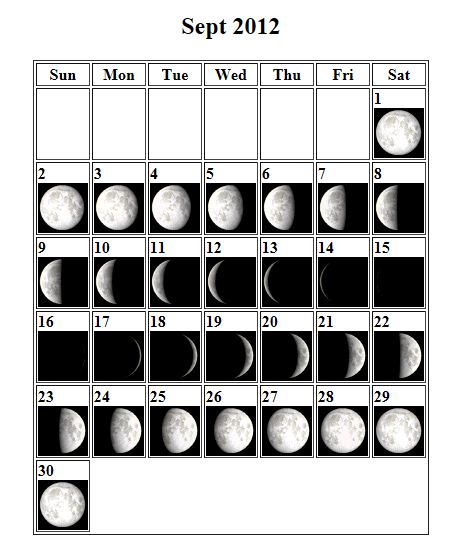
Moon phases

When planning night photography trips it is often best if you can plan around the moon, that is to photograph stars and star trails you do NOT want a bright moon.

Moon phases: http://stardate.org/nightsky/moon

Note: This tool displays the approximate Moon phases. For official phase times and dates for this month, check our Stargazing page. Moon rise/set times are available from the U.S. Naval Observatory.


August 18th -- "The Future of Photography...Revealed!"


100 Main Street

Melrose, MA 02176-6104

(781) 662-8822

POLISH YOUR MIRRORLESS IMAGING SKILLS AT
FREE SEMINARS FROM HUNT’S PHOTO & VIDEO, SAT., AUGUST 18TH

(MELROSE, MA) – Conquer the new digital imaging frontier at a pair of FREE, educational workshops hosted by Hunt’s Photo & Video. The workshops, titled, The Future of Photography…Revealed! will be led by world-renowned photo innovator Will Crockett on Saturday, August 18, 2012 at the Holiday Inn Rockland, 929 Hingham Street, Rockland. They will examine the capabilities of the new generation of mirrorless cameras that is making picture-taking easier, more creative, less expensive, and more fun. The workshops will be held from 10:00 am – noon, and 2:00 – 4:00 pm.

The workshops will examine the mirrorless imaging’s impact on technology, including its effect on camera sizes, speeds, weights, and capabilities. “The new mirrorless cameras are smaller and lighter, and you can produce extremely high-quality still pictures, incredible HD videos, and even 2D and 3D images with them,” explains Hunt’s Director of Retail Operations Mike Mitchell. “Mirrorless cameras allow the user to be more creative without having to carry around a lot of heavy equipment.”

The seminars are appropriate for point-and-shoot camera users, hobbyists, and other imaging enthusiasts who want to move up to the next skill level. Trained representatives from Hunt’s will be on hand to answer questions and demonstrate the new equipment. The Hunt’s Photo store in Hanover is located at 1207 Washington Street, Hanover, just minutes from the Holiday Inn Rockland.

Reserve your space NOW for the free, “Future of Photography” workshops at www.futureofphoto.com. Email info@crockettco.com with questions. Learn more about Hunt’s Photo’s products and services for photographers at all levels at www.huntsphotoandvideo.com, or phone 781-662-8822.

ABOUT HUNT’S PHOTO AND VIDEO

Headquartered in Melrose, MA, with branches in Hanover, Boston, Cambridge, and Hadley, MA, Manchester, NH, Providence, RI, and So. Portland, ME, Hunt’s Photo and Video is the largest digital imaging equipment retailer in New England. Hunt’s serves beginner, student, hobbyist and professional photographers throughout the nation and the world with competitive pricing, unparalleled sales expertise and exceptional customer service. Enjoy “a picture perfect experience” every time you do business with Hunt’s. Learn more on the Hunt’s website at www.huntsphotoandvideo.com.
Click to view in a browser.

Share this with a friend!
ShootSmarter.comOver 70 DVD titles to choose from.All videos photo education for mirrorless cameras.Click to reserve your seat now.Join us on Facebook!Follow our super boards.Stay up on the latest news with our tweets.Get our latest video updates.Use Google Reader? Get our latest smArticles delivered to your browser.View in a browser.Forward to a friend.New content for pro photographers.Over 70 titles for photo education.All video photo education for the emerging pro photographer.Click for more information.

Florida's Air Stream Ranch

Rick Sammon's recent Blogpost included a photo from this RV "art" roadside attraction. Something different for those snowbirds and photo travelers amongst us!


photo by Rick Sammon, click on photo to go to his blogpost!


Airstream Ranch was created by RV Dealership owner Frank Bates of Bates Rv in Dover, Florida.

Mr. Bates decided to plant 8 Airstreams in the ground to represent the history for the Airstream line of campers, This task was met with a lot of battles along the way with Hillsborough county, leading to several court appearances, Mr. Bates has a passion for Airstream campers and decided to fight the county for the right to keep them where they were, The county stated it was an eye sore, a sign, storage of unwanted Trailers among many other reasons, even though there are no signs or advertisement on the traileres or the land the county wanted them gone, Mr. Bates explained that it was put there as art and not as advertisement and even had a petition signed by 1,000's of people the area has been used by several musical groups as well as a few music videos and even used for wedding pictures, after many months of batteling Mr. Bates has won and per a judges findings Airstream Ranch is here to stay if you would like to see a video documentary of Airstream Ranch click here.

Bates RV Exchange

Address:  4656 Mcintosh Rd, Dover, FL
Directions: Bates RV Exchange. I-4 exit 14, southwest corner. Park in the Bates RV lot, tell them why you're there, then follow the golf cart path from the back to Airstream Ranch, which extends along the south side of the interstate.
Hours: Daylight hours. (Call to verify)
Phone: 813-659-0008
RA Rates: Worth a Detour